Pay Yourself First: Budget Savings Before Spending
By Cells and Cents. Published November 21, 2026.
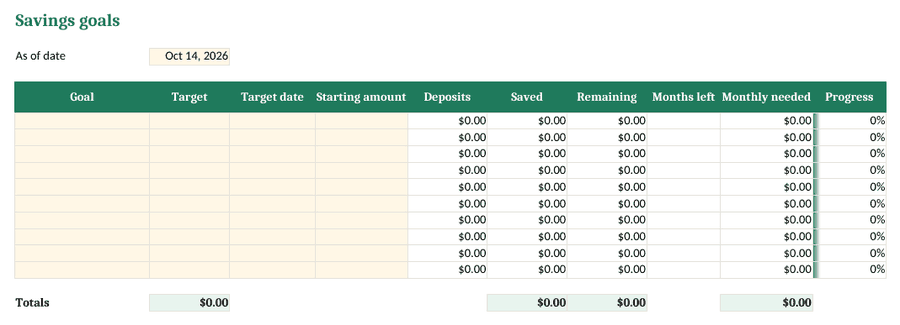
To pay yourself first means moving money into savings as soon as you get paid, before you pay bills or spend. Instead of saving whatever is left at the end of the month, savings becomes the first line you fund. In a budget, that is a Savings category you fill on payday, ahead of your variable spending.
This is for informational purposes only and is not tax, legal, or financial advice.
Below we cover what the method means and why the order matters, how to set it up in a budget spreadsheet, and a worked example: a made-up January where the savings line is funded first on each payday, tracked in our Savings Goals Tracker and Monthly Budget templates and recalculated from their own formulas.
What pay yourself first means
The idea is about order, not amount. The Consumer Financial Protection Bureau's Set a goal and start a savings habit puts it this way: "Determine how much you can set aside for savings every pay period and put the money in the bank before you pay your other bills."
A CFPB classroom activity, Saving each payday, adds a useful way to think about it: "When you pay yourself first, you're prioritizing your savings like you would a monthly bill you have to pay." In other words, savings gets a line in the plan just like rent or the phone bill, instead of waiting to see what is left.
Why the order matters
The usual alternative is to pay the bills, spend through the month, and save what remains. That works in months when something remains. The Federal Reserve's Report on the Economic Well-Being of U.S. Households in 2025 (May 2026) gives a sense of how often that happens and how it relates to savings:
- 63 percent of adults said they would cover a hypothetical $400 emergency expense entirely with cash or its equivalent, unchanged from the previous three years.
- 55 percent of adults said they had set aside money for three months of expenses in an emergency or "rainy day" fund in 2025, down from a high of 59 percent in 2021.
- 86 percent of adults who said they always had money left over at the end of the month had savings to cover three months of expenses, compared with 13 percent of those who never had money left over.
The survey shows a link, not a cause. But it does point to the weak spot in saving what is left over: in a month with nothing left, nothing gets saved. Paying yourself first moves the savings decision to payday, when the money is still there, and lets the rest of the month adjust around it.
How to set up pay yourself first
1. Pick an amount you can repeat every payday
Consistency matters more than size. The CFPB's guide to building an emergency fund suggests creating "a system for making consistent contributions" and aiming for a specific amount. The Saving each payday guide mentions saving 10 percent of net income as one rule of thumb, then adds that "you'll want to decide what savings amount works for you at different points in your life."
If you are saving toward something specific, like a trip or a car down payment, the amount usually comes from the goal itself. Our guide on how to set a savings goal walks through working out that monthly amount, so we will not repeat it here.
2. Make the move on payday
The method only works if the transfer happens before spending starts. The CFPB lists two common ways to make it automatic: recurring transfers from checking to savings that you schedule with your bank or credit union, and asking your employer to split a direct deposit between checking and savings. Its emergency fund guide also suggests keeping an eye on your checking balance so an automatic transfer does not cause an overdraft fee.
3. Put savings at the top of your budget
In the Monthly Budget template, each month tab lists categories in the same order as the Setup tab. If you list your Savings categories right after your income on Setup, they appear above your bills and spending on every month tab. That puts the plan on the page in the order you pay it: income, then savings, then everything else.
4. Log the deposit first
In the Savings Goals Tracker, each transfer goes on the Deposits tab with a date, the goal (picked from a dropdown), the amount and an optional note. Logging it on payday, before anything else, keeps the record in step with the habit. The Goals tab then shows saved so far, what remains, and progress for each goal.
Worked example: a January where savings comes first
We filled in copies of the Savings Goals Tracker and the Monthly Budget template for a made-up single earner paid twice a month, then recalculated both workbooks in LibreOffice and checked every total separately in a short script. Everything matched to the cent. These are sample numbers only, not a suggestion for what anyone should earn, spend or save.
Step 1: the plan
- Take-home pay: two paychecks of $1,825.00, on Friday, January 8 and Friday, January 22, 2027, for $3,650.00 in January.
- Paid first on each payday: $125.00 to an Emergency fund goal and $50.00 to a Summer trip goal, $175.00 per paycheck.
- That leaves $1,825.00 - $175.00 = $1,650.00 of each paycheck for bills and spending, and $350.00 saved for the month.
On the Setup tab of the Monthly Budget (year set to 2027), we listed the categories in this order, with these monthly budgets:
- Paycheck (Income): $3,650.00
- Emergency fund (Savings): $250.00
- Summer trip (Savings): $100.00
- Fixed: Rent or mortgage $1,250.00, Utilities $135.00, Phone and internet $110.00, Insurance $132.00, Car payment $245.00, Subscriptions $28.00
- Variable: Groceries $460.00, Gas and transit $150.00, Dining out $100.00, Shopping $80.00, Entertainment $60.00, Personal care $40.00, Miscellaneous $60.00
The Jan tab's budget column shows Total income $3,650.00, Total savings $350.00, Total fixed $1,900.00, Total variable $950.00, Money left over $450.00 and a Savings rate of 9.6%.
Step 2: January 8, the first payday
The first entries of the month were the paycheck and the two savings moves, before any bill or purchase:
- Paycheck: $1,825.00 actual
- Emergency fund: $125.00 actual
- Summer trip: $50.00 actual
At that point the Jan tab's actual column reads Total income $1,825.00, Total savings $175.00 and Money left over $1,650.00, the amount available for the next two weeks. The actual Savings rate already shows 9.6% ($175.00 of $1,825.00). The other lines still show their full budget as a negative Difference, because nothing has been entered for them yet.
Step 3: the deposits in the Savings Goals Tracker
On the Goals tab, we entered two goals:
- Emergency fund: target $3,600.00, target date Dec 31, 2027, starting amount $600.00
- Summer trip: target $600.00, target date Jun 30, 2027, starting amount $0.00
On the Deposits tab, the first rows of the log are the payday moves, each with the note "payday, moved first":
- Jan 8, 2027: Emergency fund, $125.00
- Jan 8, 2027: Summer trip, $50.00
- Jan 22, 2027: Emergency fund, $125.00
- Jan 22, 2027: Summer trip, $50.00
With the As of date set to Jan 31, 2027, the Goals tab shows:
- Emergency fund: deposits $250.00, saved $850.00, remaining $2,750.00, months left 11, monthly needed $250.00, progress 24%
- Summer trip: deposits $100.00, saved $100.00, remaining $500.00, months left 5, monthly needed $100.00, progress 17%
- Totals: target $4,200.00, saved $950.00, remaining $3,250.00, monthly needed $350.00
The monthly needed total of $350.00 matches the $350.00 moved first in January, so both goals are on schedule for their target dates. (The As of date in the template normally uses today's date, so months left and monthly needed change as the calendar moves.)
Step 4: the month-end budget
By January 31, every line had an actual amount. Some lines came in over plan and some under:
- Utilities: $151.38 against $135.00, Difference $16.38
- Groceries: $488.12 against $460.00, Difference $28.12
- Gas and transit: $139.40 against $150.00, Difference -$10.60
- Dining out: $126.55 against $100.00, Difference $26.55
- Shopping: $94.99 against $80.00, Difference $14.99
- Entertainment: $45.00 against $60.00, Difference -$15.00
- Personal care: $31.75 against $40.00, Difference -$8.25
- Miscellaneous: $72.30 against $60.00, Difference $12.30
All other lines matched their budgets. The Jan tab's totals:
- Total income: $3,650.00 budgeted, $3,650.00 actual
- Total savings: $350.00 budgeted, $350.00 actual
- Total fixed: $1,900.00 budgeted, $1,916.38 actual ($16.38 over)
- Total variable: $950.00 budgeted, $998.11 actual ($48.11 over)
- Money left over: $450.00 budgeted, $385.51 actual
- Savings rate: 9.6% budgeted and actual
What the example shows
Spending ran $16.38 + $48.11 = $64.49 over plan, and Money left over dropped by the same amount: $450.00 - $64.49 = $385.51. The $350.00 in savings did not change, because it was moved on payday before the spending happened. Had this month used save-what-is-left-over instead, the savings amount would have depended on how the spending turned out.
The Summary tab's January row picks up the same actual totals: Income $3,650.00, Fixed $1,916.38, Variable $998.11, Savings $350.00 and Left over $385.51.
Pairing it with other savings methods
Paying yourself first is about when you save. It works alongside methods that decide what you save for or how much:
- The 52 week savings challenge sets a weekly amount that grows through the year, and each week's deposit can be the first move of that week.
- A sinking fund sets aside money for a known future bill, which can be one of your pay-yourself-first lines.
- An emergency fund is a common first goal to fund this way.
- In a zero-based budget, savings can be the first job you give your take-home pay.
Getting the templates
The Savings Goals Tracker costs $12. It tracks up to 10 goals at once, shows the monthly amount needed to hit each target date, keeps a deposit log where you pick the goal from a dropdown, shows a progress bar for each goal, and includes an emergency fund months-of-expenses calculator.
The Monthly Budget costs $12. It has 12 monthly tabs plus a yearly summary, budgeted vs actual with automatic differences, customizable categories, and savings rate and money-left-over indicators.
Both are Excel (.xlsx) files. They only track the numbers you enter; they do not move or hold any money.
Sources
- CFPB, Set a goal and start a savings habit: the definition of paying yourself first
- CFPB, Saving each payday (Building blocks activity guide): savings prioritized like a monthly bill, and the 10 percent of net income rule of thumb
- CFPB, An essential guide to building an emergency fund: consistent contributions, recurring transfers, split direct deposit, and watching for overdraft fees
- Federal Reserve Board, Report on the Economic Well-Being of U.S. Households in 2025 (May 2026): the 63 percent, 55 percent, 86 percent and 13 percent figures
- Savings Goals Tracker template page and Monthly Budget template page: features and prices
- All example results: recalculated from the templates' own formulas, with the tracker's As of date set to Jan 31, 2027
FAQ
What does pay yourself first mean?
It means setting money aside for savings as soon as you get paid, before you pay other bills or spend on anything else. The CFPB describes it as deciding how much you can set aside every pay period and putting that money in the bank before you pay your other bills.
How is pay yourself first different from saving what is left over?
With saving what is left over, savings comes last and depends on how the month went. With pay yourself first, the savings amount is decided and moved on payday, and the rest of the month's spending works with what remains. In our made-up January, spending ran $64.49 over plan, and that came out of money left over while the $350.00 already saved stayed the same.
How much should I pay myself first?
That depends on your income, bills and goals. A CFPB classroom guide mentions saving 10 percent of net income as one rule of thumb, and adds that you will want to decide what amount works for you at different points in your life. If you are saving for a specific goal, our guide on how to set a savings goal shows how to work out a monthly amount.
Can I automate pay yourself first?
Many people do. The CFPB mentions asking your employer to split a direct deposit between checking and savings, or setting up recurring transfers from checking to savings through your bank or credit union. It also suggests watching your checking balance so a transfer does not cause an overdraft fee.
How do I show pay yourself first in a budget spreadsheet?
In the Monthly Budget template, list your Savings categories on the Setup tab right after your income, so they sit above your bills and spending on every month tab, and enter their actual amounts on payday. In the Savings Goals Tracker, log the transfer on the Deposits tab as the first entry each payday.
What does the worked example show?
A made-up January 2027 with two $1,825.00 paychecks. On each payday, $125.00 went to an emergency fund goal and $50.00 to a summer trip goal before anything else, $350.00 for the month and a 9.6% savings rate. Money left over came to $385.51 against $450.00 planned.
Related templates
Savings Goals Tracker
Set goals, track deposits, and see the monthly amount needed to hit each one.
$12
View templateMonthly Budget
Plan every dollar for the month and see what is left at a glance.
$12
View template