Zero-Based Budget Template: Give Every Dollar a Job
By Cells and Cents. Published November 13, 2026.
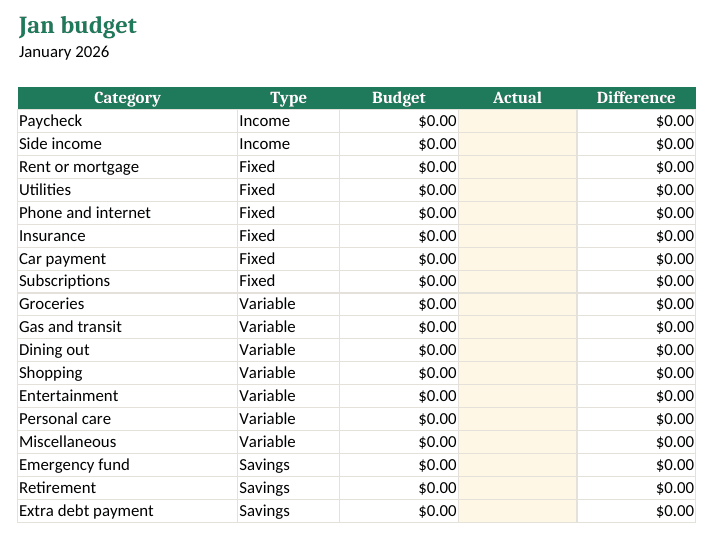
A zero-based budget template is a spreadsheet where you give every dollar of take-home pay a job, so planned income minus planned bills, spending and savings equals $0.00. In our made-up one-earner December, a $4,480.00 paycheck was fully assigned in the Monthly Budget template. The plan had $0.00 left over.
This is for informational purposes only and is not tax, legal, or financial advice.
Below we cover what zero-based budgeting means and how to set it up in the Monthly Budget Excel template. The aim is a plan that itself reaches $0.00 left over. Then comes a worked example: a made-up single earner's December 2026, with every total taken from the recalculated workbook.
What a zero-based budget is
A zero-based budget starts with take-home pay and assigns every dollar a job (a bill, a spending category, or a savings line) until nothing is left unassigned. The plan is done when:
- Money left over = total income minus total fixed, total variable and total savings = $0.00
"Left over" here is not a goal to spend down to zero in real life. It is the unassigned amount in the plan. If a dollar has no job yet, it still needs one, even if that job is a savings line or a buffer category.
The Consumer Financial Protection Bureau's Analyzing budgets teacher guide says a budget should be made using your net income, the amount you receive in your paycheck after taxes and other deductions are taken out. It also calls this take-home pay. That is the starting number for the plan below.
Zero-based budgeting does not require a 50/30/20 split, cash envelopes, or any particular mix of categories. It only requires that the planned amounts add up to take-home pay.
How to set up a zero-based budget template in the Monthly Budget
The Monthly Budget template has a Setup tab where you list up to 30 categories, give each one a type and a monthly budget. The Type column accepts four values: Income, Fixed, Variable or Savings. Each month tab then totals the lines by type at the bottom (Total income, Total fixed, Total variable, Total savings), shows Money left over, and shows a Savings rate (total savings divided by total income).
The product copy already describes this as giving every dollar a job. To make the plan zero-based, use the types in the usual way and keep adjusting the budget amounts until Money left over is $0.00:
- Income: your paycheck (and any other take-home income).
- Fixed: bills that are about the same every month, such as rent, insurance or a car payment.
- Variable: spending that changes month to month, such as groceries, gas or dining out.
- Savings: money you move toward a goal, such as an emergency fund, retirement or paying extra on a debt. If the first pass leaves a leftover, assign that remainder to a savings line or a buffer category so the plan reaches $0.00.
Each of the 12 month tabs pulls the categories and budget amounts from Setup, so you enter the plan once. On each month tab you only fill in the Actual column. Difference is actual minus budget. For a spending line, a positive number means you spent more than planned.
The template does not move money or connect to a bank account. It only totals the numbers you enter.
Worked example: a one-earner December
We set up a made-up single earner on the Setup tab of a copy of the Monthly Budget, entered made-up December 2026 actuals on the Dec tab, and recalculated the workbook in LibreOffice. These are sample numbers only, not a suggestion for what anyone should earn, spend or save. We removed the starter Side income line so the example stays on one paycheck.
Step 1: start from take-home pay
Take-home pay for the month is $4,480.00. In a zero-based plan, the jobs you give that money must add up to $4,480.00.
Step 2: categories, types and budgets
We kept the starter categories and types (except Side income), then set budget amounts that add up to the paycheck.
Income:
- Paycheck: $4,480.00
Fixed, budgets add up to $2,140.00:
- Rent or mortgage: $1,425.00
- Utilities: $155.00
- Phone and internet: $88.00
- Insurance: $125.00
- Car payment: $295.00
- Subscriptions: $52.00
Variable, budgets add up to $1,220.00:
- Groceries: $480.00
- Gas and transit: $150.00
- Dining out: $200.00
- Shopping: $140.00
- Entertainment: $90.00
- Personal care: $70.00
- Miscellaneous: $90.00
Savings, budgets add up to $1,120.00:
- Emergency fund: $500.00
- Retirement: $400.00
- Extra debt payment: $220.00
Check: $2,140.00 + $1,220.00 + $1,120.00 = $4,480.00.
In the plan, the Dec tab shows Total income $4,480.00, Total fixed $2,140.00, Total variable $1,220.00, Total savings $1,120.00, Money left over $0.00 and a Savings rate of 25.0%. Every dollar in the plan has a job.
Step 3: the actual month
We typed these actuals in the Dec tab's Actual column. The Difference column (actual minus budget) is filled in by the template.
- Paycheck: $4,480.00 (difference $0.00)
- Utilities: $168.42 (difference $13.42)
- Groceries: $512.67 (difference $32.67)
- Gas and transit: $138.20 (difference -$11.80)
- Dining out: $176.45 (difference -$23.55)
- Shopping: $163.18 (difference $23.18)
- Entertainment: $74.00 (difference -$16.00)
- Miscellaneous: $54.39 (difference -$35.61)
- Every other line matched its budget: Rent or mortgage $1,425.00, Phone and internet $88.00, Insurance $125.00, Car payment $295.00, Subscriptions $52.00, Personal care $70.00, Emergency fund $500.00, Retirement $400.00 and Extra debt payment $220.00.
Step 4: what the Dec tab shows at the bottom
- Total income: $4,480.00 budgeted, $4,480.00 actual
- Total fixed: $2,140.00 budgeted, $2,153.42 actual
- Total variable: $1,220.00 budgeted, $1,188.89 actual
- Total savings: $1,120.00 budgeted, $1,120.00 actual
- Money left over: $0.00 budgeted, $17.69 actual
- Savings rate: 25.0% budgeted, 25.0% actual
Step 5: where the $17.69 leftover comes from
- Fixed ran over by $13.42, all on utilities: $2,153.42 minus $2,140.00 = $13.42.
- Variable came in under by $31.11: $1,220.00 minus $1,188.89 = $31.11. Groceries and shopping were over by $32.67 and $23.18, while gas and transit, dining out, entertainment and miscellaneous were under by $11.80, $23.55, $16.00 and $35.61.
- Savings matched the plan at $1,120.00.
- Money left over: $4,480.00 minus $2,153.42 minus $1,188.89 minus $1,120.00 = $17.69, which is the $31.11 variable came in under, minus the $13.42 fixed ran over.
The $17.69 is unassigned money in the actual month. The plan was still zero-based. Some people give that leftover a job in the next month's plan, such as adding it to a savings line; others leave it as a cushion. Either way, the budget only records the choice.
The Summary tab picks up the same December actuals: income $4,480.00, fixed $2,153.42, variable $1,188.89, savings $1,120.00, left over $17.69 and a 25.0% savings rate.
How this differs from our other budget examples
Our personal budget example in Excel walks through a month with the starter categories and types unchanged, and the plan in that example still had money left over. The 50/30/20 budget template example also uses one earner, but it changes the types so the totals read as needs, wants and savings. The shared budget spreadsheet example covers a two-paycheck household. This guide keeps one earner, keeps the starter types, and assigns every planned dollar so Money left over is $0.00. If money is tight and the first pass will not reach zero without cutting essentials, how to budget money on low income walks through a budget that covers essentials first. If a savings line is for a known future cost, see what a sinking fund is.
Which template fits
The Monthly Budget template costs $12. It has 12 monthly tabs plus a yearly summary, budgeted vs actual with automatic differences, customizable categories, savings rate and money left over indicators, and a chart that updates as you type. If you want to try a simpler one-month version first, the free starter budget spreadsheet has budgeted vs actual columns, automatic totals, money left over and a savings rate.
If a savings line is split across several goals, the Savings Goals Tracker costs $12 and tracks up to 10 goals with the monthly amount needed for each target date.
These are .xlsx files built for Microsoft Excel, with no macros. They only total the numbers you enter; they do not connect to any bank accounts or move any money.
Sources
- Consumer Financial Protection Bureau, Analyzing budgets (Building Blocks teacher guide, Summer 2022): building a budget from net income (take-home pay)
- Monthly Budget template page, Savings Goals Tracker template page and free starter budget spreadsheet: features and prices
- All example results: entered in a copy of the Monthly Budget template and recalculated from its own formulas in LibreOffice on November 11, 2026
FAQ
What is a zero-based budget template?
It is a spreadsheet where you give every dollar of take-home pay a job, so planned income minus planned bills, spending and savings equals $0.00. On the month tab, that means the Budget column's Money left over line is $0.00.
How do you set up a zero-based budget in the Monthly Budget template?
On the Setup tab, list your categories with a type of Income, Fixed, Variable or Savings, and budget amounts that add up to your take-home pay. Each month tab then shows Money left over as total income minus total fixed, total variable and total savings. Adjust the budget amounts until that figure is $0.00.
What if there is money left over at the end of the month?
The plan can still be zero-based even if the actual month is not. In our made-up December, the plan had $0.00 left over and the actual month had $17.69 left over, because some spending came in under budget by more than other lines ran over. The leftover is unassigned money you can give a job in the next month's plan.
Is a zero-based budget the same as the 50/30/20 rule?
No. Zero-based budgeting assigns every dollar until the plan reaches $0.00 left over. It does not require a 50/30/20 split. You can use both ideas in the same spreadsheet, but they are different methods.
What does the worked example show?
A made-up single earner with $4,480.00 of take-home pay in December 2026. The plan assigned $2,140.00 to fixed bills, $1,220.00 to variable spending and $1,120.00 to savings, leaving $0.00 and a 25.0% savings rate. The actual month came in at $2,153.42 fixed, $1,188.89 variable and $1,120.00 savings, with $17.69 left over.
Related templates
Monthly Budget
Plan every dollar for the month and see what is left at a glance.
$12
View templateSavings Goals Tracker
Set goals, track deposits, and see the monthly amount needed to hit each one.
$12
View template