Personal budget example in Excel: a filled-in month
By Cells and Cents. Published October 30, 2026.
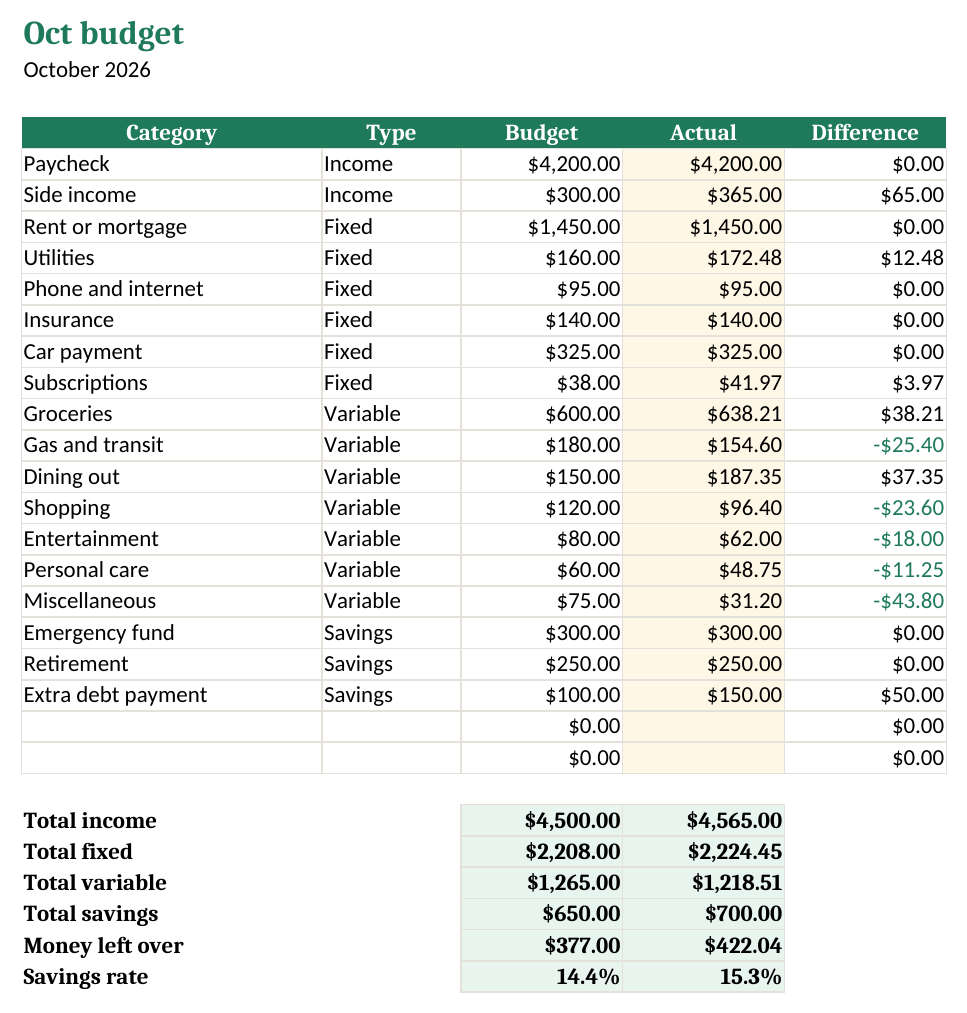
A personal budget example in Excel is a filled-in sheet that lists one month of income, fixed bills, variable spending and savings, with a planned amount and an actual amount on each line. The spreadsheet totals each group and subtracts spending and savings from income to show the money left over.
This is for informational purposes only and is not tax, legal, or financial advice.
Below we cover what goes in a personal budget, a simple set of household budget categories, and a worked example: one made-up month entered line by line in our Monthly Budget template, with every total exactly as the recalculated sheet shows it.
What goes in a personal budget
A monthly budget has two jobs. First, it is a plan: how much you expect to earn and where you intend each dollar to go. Second, it is a check: what actually came in and went out, so you can see where the plan held and where it did not.
The Consumer Financial Protection Bureau's spending tracker (part of its Your Money, Your Goals toolkit) suggests starting with the check. It says that keeping track of what you earn and everything you spend for a month, rather than just a week or two, lets you see all of your income and expenses in one place. It then suggests circling items that are the same every month, like rent, car or cell phone payments, since these are often your needs and obligations, and says this makes creating your budget easier.
That split is the backbone of most budget spreadsheets:
- Income: paychecks and any side income.
- Fixed: bills that are about the same every month, such as rent, insurance or a car payment.
- Variable: spending that changes month to month, such as groceries, gas or dining out.
- Savings: money you move toward a goal, such as an emergency fund, retirement or paying extra on a debt.
A simple household budget template in Excel
The Monthly Budget template starts with these categories on its Setup tab, each with a type picked from a dropdown (Income, Fixed, Variable or Savings) and a monthly budget amount:
- Income: Paycheck, Side income
- Fixed: Rent or mortgage, Utilities, Phone and internet, Insurance, Car payment, Subscriptions
- Variable: Groceries, Gas and transit, Dining out, Shopping, Entertainment, Personal care, Miscellaneous
- Savings: Emergency fund, Retirement, Extra debt payment
You can rename, delete or add categories, up to 30 in total. Each of the 12 month tabs pulls the categories and budget amounts from Setup, so you enter the plan once. On each month tab you only fill in the Actual column, and the sheet works out the rest.
Worked example: one month in the Monthly Budget template
We entered a made-up household's plan on the Setup tab and its made-up October 2026 spending on the Oct tab of a copy of the Monthly Budget, then recalculated the workbook. These are sample numbers only, not a suggestion for what anyone should earn, spend or save.
Income (budget, then actual):
- Paycheck: $4,200.00 budgeted, $4,200.00 actual
- Side income: $300.00 budgeted, $365.00 actual
Fixed bills:
- Rent or mortgage: $1,450.00 budgeted, $1,450.00 actual
- Utilities: $160.00 budgeted, $172.48 actual
- Phone and internet: $95.00 budgeted, $95.00 actual
- Insurance: $140.00 budgeted, $140.00 actual
- Car payment: $325.00 budgeted, $325.00 actual
- Subscriptions: $38.00 budgeted, $41.97 actual
Variable spending:
- Groceries: $600.00 budgeted, $638.21 actual
- Gas and transit: $180.00 budgeted, $154.60 actual
- Dining out: $150.00 budgeted, $187.35 actual
- Shopping: $120.00 budgeted, $96.40 actual
- Entertainment: $80.00 budgeted, $62.00 actual
- Personal care: $60.00 budgeted, $48.75 actual
- Miscellaneous: $75.00 budgeted, $31.20 actual
Savings:
- Emergency fund: $300.00 budgeted, $300.00 actual
- Retirement: $250.00 budgeted, $250.00 actual
- Extra debt payment: $100.00 budgeted, $150.00 actual
What the Oct tab shows at the bottom:
- Total income: $4,500.00 budgeted, $4,565.00 actual
- Total fixed: $2,208.00 budgeted, $2,224.45 actual
- Total variable: $1,265.00 budgeted, $1,218.51 actual
- Total savings: $650.00 budgeted, $700.00 actual
- Money left over: $377.00 budgeted, $422.04 actual
- Savings rate: 14.4% budgeted, 15.3% actual
How to read it, step by step:
- Difference on each line is actual minus budget. Side income shows $65.00, so the household earned more than planned. Groceries shows $38.21 and Dining out shows $37.35, so those ran over. Utilities ($12.48) and Subscriptions ($3.97) also ran a little over.
- Lines that came in under budget show a negative difference in green: Gas and transit (-$25.40), Shopping (-$23.60), Entertainment (-$18.00), Personal care (-$11.25) and Miscellaneous (-$43.80).
- Totals add every line of the same type. Fixed bills came to $2,224.45 against $2,208.00 planned. Variable spending came to $1,218.51, below the $1,265.00 planned, because the lines that came in under budget outweighed groceries and dining out.
- Money left over is total income minus total fixed, total variable and total savings. The plan left $377.00. The actual month left $422.04: $4,565.00 minus $2,224.45, minus $1,218.51, minus $700.00.
- Savings rate is total savings divided by total income. It is 14.4% in the plan ($650.00 of $4,500.00) and 15.3% in the actual month ($700.00 of $4,565.00). The template counts every line typed as Savings, so the extra debt payment is part of that rate.
The Summary tab picks up the same actual totals for October: income $4,565.00, fixed $2,224.45, variable $1,218.51, savings $700.00, left over $422.04 and a 15.3% savings rate. Because only October has actuals in this copy, the year totals on the Summary tab are the same numbers.
What the example shows is the pattern, not the amounts. Two categories (groceries and dining out) did most of the overspending, while several small categories came in under. That is the kind of thing a month of tracking makes visible, and it is where you would look first when setting next month's plan.
Building your own monthly budget example
A few steps that keep a first budget simple:
- List your income sources and the bills that are the same every month. Those are the easiest numbers to fill in.
- For variable categories, start with what you actually spent last month if you have the statements, rather than a number you hope to hit.
- Decide on your savings lines before the month starts, so they are part of the plan and not whatever happens to be left.
- Fill in actuals as the month goes, then compare the Difference column at the end and adjust next month's budget amounts on the Setup tab.
The CFPB also notes that timing matters, not only totals. Its cash flow budget tool is about tracking the timing of your income and expenses to make sure you have enough from week to week. A monthly budget can balance on paper while one week still runs short, so it can help to note when big bills are due.
If you are saving toward something specific, our guide to what a sinking fund is shows how to turn a known future cost into a monthly savings line. If paying down debt is the goal, the debt snowball vs avalanche guide compares two ways to order extra payments.
Where to get the template
The Monthly Budget template costs $12. It has 12 monthly tabs plus a yearly summary, budgeted vs actual with automatic differences, customizable categories, savings rate and money left over on every month, and a chart on the Summary tab. If you want to try a simpler one-month version first, the free starter budget spreadsheet has budgeted vs actual columns, automatic totals, money left over and a savings rate.
Both are .xlsx files built for Excel. They only total the numbers you enter; they do not connect to any bank accounts.
Sources
- CFPB, Spending tracker (Your Money, Your Goals toolkit): tracking a full month of income and spending, and circling items that are the same every month as needs and obligations
- CFPB, Creating a cash flow budget (Your Money, Your Goals toolkit): tracking the timing of income and expenses week to week
- Monthly Budget template page and free starter budget page: features and price
- All example results: recalculated from the Monthly Budget template's own formulas with made-up October 2026 numbers
FAQ
What does a personal budget example in Excel look like?
It is a list of categories for one month, each marked as income, a fixed bill, variable spending or savings, with a budgeted amount and an actual amount. The sheet totals each group and shows what is left over. In our made-up example, the budget planned $377.00 left over and the actual month came out to $422.04.
What categories should a household budget have?
A common starting point is income (paychecks and side income), fixed bills (rent or mortgage, utilities, phone and internet, insurance, car payment, subscriptions), variable spending (groceries, gas and transit, dining out, shopping, entertainment, personal care, miscellaneous) and savings (emergency fund, retirement, extra debt payments). Those are the starter categories in the Monthly Budget template, and you can rename or replace them.
How is money left over calculated?
In the Monthly Budget template it is total income minus total fixed, total variable and total savings. It is worked out twice, once for the budget column and once for the actual column, so you can compare the plan with what happened.
What does a positive difference mean in the budget?
Difference is actual minus budget. For a spending line, a positive number means you spent more than planned. For an income line, a positive number means you earned more than planned. Negative differences show in green on the month tabs.
Is there a free budget template in Excel?
Cells and Cents has a free starter budget spreadsheet, a one-month .xlsx sheet built for Excel with budgeted vs actual columns, automatic totals, money left over and a savings rate. The full Monthly Budget template adds 12 monthly tabs and a yearly summary.
Related templates
Monthly Budget
Plan every dollar for the month and see what is left at a glance.
$12
View templateSavings Goals Tracker
Set goals, track deposits, and see the monthly amount needed to hit each one.
$12
View template