What is a sinking fund? Categories, examples, and setup
By Cells and Cents. Published October 26, 2026.
What is a sinking fund? It is money set aside a little at a time for a specific expense you know is coming, like a car insurance renewal, holiday gifts, or an annual subscription. Divide the cost by the months until it is due and save that amount monthly, so the money is there when the bill arrives.
This is for informational purposes only and is not tax, legal, or financial advice.
Below we cover how sinking funds work, common sinking funds categories and examples, how a sinking fund differs from an emergency fund, and a worked example with three made-up goals in our Savings Goals Tracker.
How a sinking fund works
CNBC Select describes sinking funds as money set aside for specific savings goals, whether that is an infrequent bill or a large one-time expense. The same article notes that predictable costs you pay every month, like rent and utilities, should stay part of your regular monthly spending plan. A sinking fund is for the costs that do not show up every month.
The math is simple division. Utah State University Extension's guide to budgeting for non-monthly expenses says to note how much each expense will be and when you need the money, count how many months you have to save, and divide the total cost by that number of months. It points out why dividing every yearly cost by 12 does not always work: some payments are due before the end of the year.
In practice, setting one up looks like this:
- Pick one expense you know is coming and estimate the amount.
- Decide the date you need the money by.
- Subtract anything you have already saved for it.
- Divide what is left by the months until that date. That is your monthly amount.
- Set that amount aside each month and track it until the bill is paid, then start the next cycle if the cost repeats.
Sinking funds categories and examples
There is no official list of sinking funds categories. The best way to build yours is to look for costs you know are coming but do not pay every month. The USU Extension guide suggests looking back over the past year of bank and credit card statements for expenses that were not part of your normal monthly spending, and checking your calendar for planned events.
The Consumer Financial Protection Bureau's savings plan tool asks whether you have money set aside for expenses that come one to four times per year, and gives these examples: automobile insurance, renter's insurance, tools for your trade, back to school expenses, birthdays, and holidays (gifts, special food, and so on). CNBC Select's list of examples of sinking funds adds gifts, vacations, a new car, home maintenance, insurance payments, car maintenance, pet care, new appliances, a wedding, and a down payment.
Grouped into categories, that gives you a starting list:
- Insurance: car, renter's, or other policies billed once or a few times a year
- Car: maintenance and a future car purchase
- Home: home maintenance and new appliances
- Family and holidays: gifts, birthdays, holidays, and back to school costs
- Fun and big plans: vacations, a wedding, or a down payment
- Work and annual bills: tools for your trade and yearly subscriptions
- Pets: pet care
You do not need every category. Start with the costs that have caught you short before, and add more only if you can keep track of them.
Sinking fund vs emergency fund
The difference is whether you can see the cost coming.
- Sinking fund: for an expected cost with a rough amount and a date, like a renewal, a holiday, or a planned purchase.
- Emergency fund: the CFPB's guide to building an emergency fund defines it as a cash reserve specifically set aside for unplanned expenses or financial emergencies, with examples like car repairs, home repairs, medical bills, or a loss of income.
The CFPB savings plan tool treats these as separate questions: one about money set aside for expenses that come one to four times per year, and another about money set aside for unexpected expenses and emergencies. CNBC Select notes that having a sinking fund can keep you from withdrawing money from your emergency fund. In other words, if the car insurance renewal has its own fund, it does not have to come out of the money meant for a surprise repair.
On how big an emergency fund should be, the CFPB says the amount depends on your situation, and suggests thinking about the most common unexpected expenses you have had in the past and what they cost.
The Savings Goals Tracker keeps the two apart. Sinking funds go on the Goals tab, each with a target date. The separate Emergency Fund tab has two inputs, essential monthly expenses and months of coverage goal (prefilled with 6, which you can change), and multiplies them to get an emergency fund target. A note on that tab suggests entering the result as the target for an Emergency fund goal on the Goals tab, so it sits alongside your sinking funds while still being sized by a different rule.
Worked example: three sinking funds in the Savings Goals Tracker
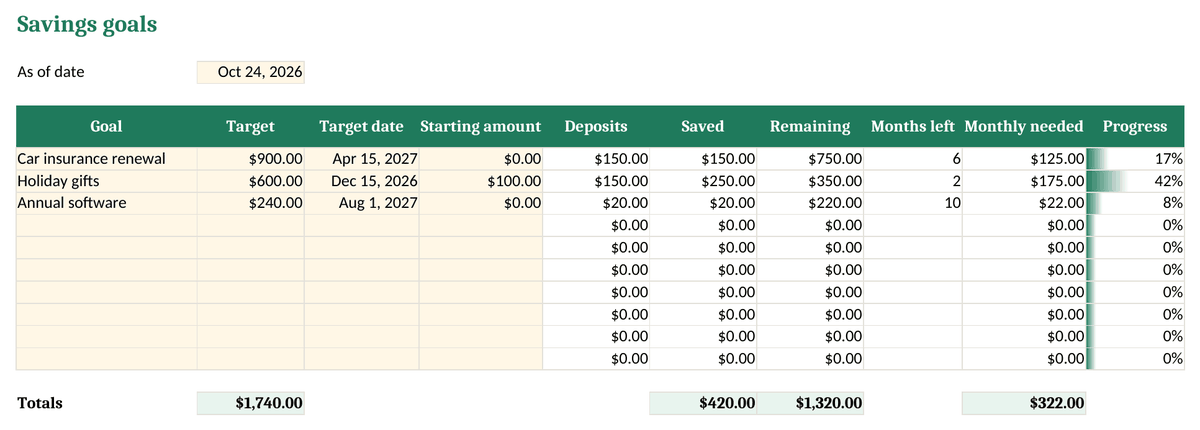
We entered three made-up goals and three made-up deposits into a copy of our Savings Goals Tracker and recalculated it. These are sample numbers only, not a recommendation for what anyone should save.
The tracker's As of date uses today's date, so the results depend on the day you open it. Ours were calculated with an As of date of Oct 24, 2026.
Inputs on the Goals tab:
- Car insurance renewal: target $900, target date Apr 15, 2027, starting amount $0
- Holiday gifts: target $600, target date Dec 15, 2026, starting amount $100
- Annual software: target $240, target date Aug 1, 2027, starting amount $0
Inputs on the Deposits tab:
- Oct 2, 2026: $150 to Car insurance renewal
- Oct 9, 2026: $150 to Holiday gifts
- Oct 16, 2026: $20 to Annual software
What the Goals tab shows:
- Car insurance renewal: deposits $150.00, saved $150.00, remaining $750.00, months left 6, monthly needed $125.00, progress 17%
- Holiday gifts: deposits $150.00, saved $250.00, remaining $350.00, months left 2, monthly needed $175.00, progress 42%
- Annual software: deposits $20.00, saved $20.00, remaining $220.00, months left 10, monthly needed $22.00, progress 8%
- Totals: target $1,740.00, saved $420.00, remaining $1,320.00, monthly needed $322.00
How to read it, step by step:
- Saved is the starting amount plus every deposit logged for that goal on the Deposits tab. Holiday gifts shows $250.00 because it started with $100 and has a $150 deposit.
- Remaining is the target minus what is saved, and never goes below zero.
- Months left counts calendar months from the As of month to the target month, with a minimum of 1. The day of the month is not counted, so October 2026 to April 2027 shows 6 for the car insurance renewal even though the bill is due mid month.
- Monthly needed is remaining divided by months left. That is the sinking fund contribution for each goal: $125.00, $175.00 and $22.00.
- Progress is saved divided by target, shown as a whole percent and capped at 100%.
- The Totals row adds the monthly needed column, $322.00 here. That is the single number you would carry into your spending plan as one savings line.
Notice how the deadline drives the result. Holiday gifts has less left to save than the car insurance renewal ($350.00 vs $750.00) but the biggest monthly amount, because only 2 months are left. Annual software is due last, so its monthly amount is the smallest. If you open the same file in a later month, months left can drop, and monthly needed can rise for any goal that has not received new deposits.
Setting up your own sinking funds
The Savings Goals Tracker costs $12 and tracks up to 10 goals at once. For each goal you enter a target, a target date and any amount already saved, then log deposits on the Deposits tab by picking the goal from a dropdown. Withdrawals go in as negative amounts, so when you pay the bill you can log it and the goal's saved amount drops back down.
A few tips that keep it manageable:
- Use the same goal name every year for repeating costs, and update the target date and amount after each bill is paid.
- Keep the emergency fund as its own goal, sized on the Emergency Fund tab, rather than mixing it into a sinking fund.
- Check the Totals row when you plan each month, since it shows the combined amount all your sinking funds need.
To make room for that total, the Monthly Budget template lays out income, fixed bills, variable spending, and savings side by side, with budgeted vs actual and customizable categories. You can add the tracker's total as a savings category and see whether it fits. The Monthly Budget costs $12.
The tracker is built for Excel. It only tracks the numbers you enter; it does not move or hold any money.
Sources
- CNBC Select, What is a sinking fund and should you have one? (updated Dec 28, 2025): definition of sinking funds, examples, monthly expenses staying in the regular budget, and sinking funds vs emergency funds
- Utah State University Extension, How do I budget for non-monthly expenses (Oct 13, 2020): dividing each cost by the months until it is due, and reviewing past statements and your calendar
- CFPB, Savings plan tool (Your Money, Your Goals): expenses that come one to four times per year and their examples, listed separately from unexpected expenses and emergencies
- CFPB, An essential guide to building an emergency fund: definition of an emergency fund and how to think about its size
- Savings Goals Tracker template page and Monthly Budget template page: features and prices
- All example results: recalculated from the tracker's own formulas with an As of date of Oct 24, 2026
FAQ
What is a sinking fund?
A sinking fund is money you set aside a little at a time for a specific expense you expect, such as an insurance renewal, holiday gifts or an annual subscription. You divide what you still need by the months left until the due date and save that amount each month.
What are common sinking funds categories?
Common ones include insurance billed once or a few times a year, car maintenance, holidays and gifts, birthdays, back to school costs, vacations, home maintenance, pet care, new appliances, annual subscriptions and planned big purchases. The right list depends on which costs you know are coming that do not show up every month.
What is the difference between a sinking fund and an emergency fund?
A sinking fund is for a cost you can see coming and can put a date on. The CFPB describes an emergency fund as a cash reserve set aside for unplanned expenses or financial emergencies, such as car repairs, home repairs, medical bills or a loss of income. Keeping them separate means a planned bill does not have to come out of your emergency savings.
How do I work out how much to put in a sinking fund each month?
Subtract what you have already saved from the target, then divide by the number of months until you need the money. In our worked example, a made-up car insurance renewal with $750.00 still needed and 6 months left came out to $125.00 a month.
Can one spreadsheet track several sinking funds and an emergency fund?
Yes. The Savings Goals Tracker holds up to 10 goals, each with its own target, target date and deposits, and it has a separate Emergency Fund tab that multiplies your essential monthly expenses by the months of coverage you choose.
Related templates
Savings Goals Tracker
Set goals, track deposits, and see the monthly amount needed to hit each one.
$12
View templateMonthly Budget
Plan every dollar for the month and see what is left at a glance.
$12
View template