Shared Budget Spreadsheet: A Two-Paycheck Example
By Cells and Cents. Published November 5, 2026.
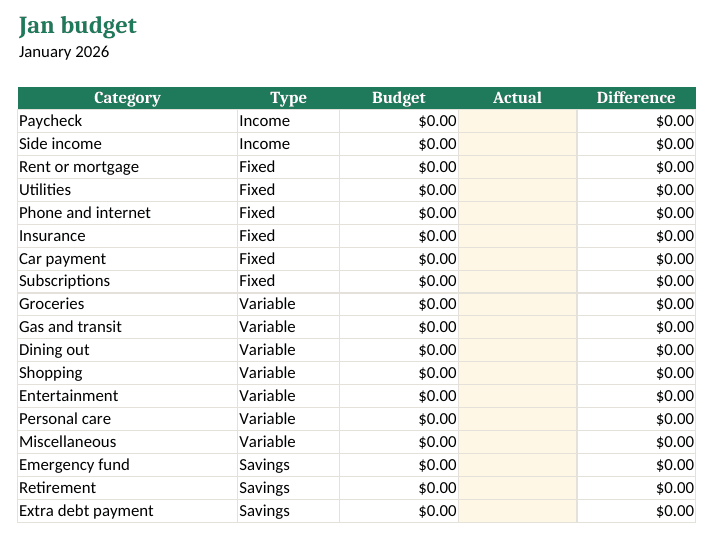
A shared budget spreadsheet is one file a couple or household uses to plan a month of income, bills, spending and savings, then compare the plan with what actually happened. For two paychecks, give each income its own line, agree on the shared categories, and let the formulas show the totals and the money left over.
This is for informational purposes only and is not tax, legal, or financial advice.
Below we cover what a shared budget needs, a few ways couples split costs, and a worked example: a made-up two-paycheck household's November entered in a copy of the Monthly Budget Excel template, with every total taken from the recalculated workbook.
What a shared budget spreadsheet needs
A shared budget does the same job as a personal one, with two people looking at the same numbers. You list categories, give each one a planned amount for the month, type in what actually came in and went out, and let the formulas add it up.
The FDIC's Saying "I Do" to Sharing Finances page suggests starting a shared budget by listing each of your income sources and expenses, and says it is important for each person to disclose their income, expenses and ability to pay. Once the items are listed, it says, you can plan who pays for what, how much to save, and how to pay down any debts.
In practice that means a shared sheet should have:
- One income line per paycheck, so both partners can see what each one brought in.
- The shared fixed bills, such as housing, utilities, insurance and childcare.
- Variable spending lines you both agree to track, such as groceries and dining out.
- Savings lines for the goals you share.
- A planned column, an actual column and a difference for each line.
Ways couples split shared costs
The same FDIC page lists a few ways to handle paying for things:
- Combine everything. Put all income together and pay all debts and obligations together.
- Split by bill. Agree on who pays for which expenses.
- Split by income share. If one partner brings in 60 percent of the income and the other 40 percent, the bills are paid in the same percentages.
A budget spreadsheet does not choose an approach for you. It shows the full household picture, so whichever approach you pick, you are both working from the same totals.
The CFPB's handout Share financial information with your spouse now to avoid problems later makes a related point: it is common for couples to share their financial lives but not the work of managing them. Its quiz asks whether each spouse knows what money is coming in, what payments the household makes, and when bills are due and how they are paid. It suggests scheduling time to go over your income, expenses, debt and investments together. A monthly look at one shared sheet is one way to do that.
Worked example: a two-paycheck November in the Monthly Budget
We set up a made-up household on the Setup tab of a copy of the Monthly Budget, entered made-up November 2026 actuals on the Nov tab, and recalculated the workbook in LibreOffice. These are sample numbers only, not a suggestion for what anyone should earn, spend or save.
Step 1: set up shared categories
The template's 30 category rows are editable. For this household we renamed Paycheck and Side income to Paycheck A and Paycheck B, one for each partner. We added Childcare as a Fixed line, replaced Shopping with Household supplies, removed Entertainment, and replaced Extra debt payment with a Holiday gifts fund typed as Savings. That leaves 18 categories.
Step 2: the plan and the actuals (budget, then actual)
Income:
- Paycheck A: $3,150.00 budgeted, $3,150.00 actual
- Paycheck B: $2,480.00 budgeted, $2,512.40 actual
Fixed bills:
- Rent or mortgage: $1,725.00 budgeted, $1,725.00 actual
- Utilities: $190.00 budgeted, $214.63 actual
- Phone and internet: $120.00 budgeted, $120.00 actual
- Insurance: $210.00 budgeted, $210.00 actual
- Car payment: $289.00 budgeted, $289.00 actual
- Subscriptions: $45.00 budgeted, $52.98 actual
- Childcare: $600.00 budgeted, $600.00 actual
Variable spending:
- Groceries: $760.00 budgeted, $812.47 actual
- Gas and transit: $210.00 budgeted, $186.30 actual
- Dining out: $140.00 budgeted, $171.25 actual
- Household supplies: $60.00 budgeted, $48.90 actual
- Personal care: $50.00 budgeted, $63.15 actual
- Miscellaneous: $90.00 budgeted, $37.80 actual
Savings:
- Emergency fund: $400.00 budgeted, $400.00 actual
- Retirement: $350.00 budgeted, $350.00 actual
- Holiday gifts fund: $150.00 budgeted, $150.00 actual
Step 3: what the Nov tab shows at the bottom
- Total income: $5,630.00 budgeted, $5,662.40 actual
- Total fixed: $3,179.00 budgeted, $3,211.61 actual
- Total variable: $1,310.00 budgeted, $1,319.87 actual
- Total savings: $900.00 budgeted, $900.00 actual
- Money left over: $241.00 budgeted, $230.92 actual
- Savings rate: 16.0% budgeted, 15.9% actual
Step 4: read it together
- Income. The Difference column (actual minus budget) shows $32.40 on Paycheck B and $0.00 on Paycheck A, so total income came in at $5,662.40 instead of $5,630.00.
- Fixed bills. Five fixed lines matched the plan exactly. Utilities shows a difference of $24.63 and Subscriptions $7.98, which is why total fixed is $3,211.61 against $3,179.00 planned.
- Variable spending. Groceries ($52.47), Dining out ($31.25) and Personal care ($13.15) ran over. Gas and transit (-$23.70), Household supplies (-$11.10) and Miscellaneous (-$52.20) came in under and show in green. Together, total variable landed at $1,319.87, close to the $1,310.00 plan.
- Savings. All three savings lines were paid as planned, so total savings is $900.00 in both columns.
- Money left over is total income minus total fixed, total variable and total savings: $5,662.40 minus $3,211.61, minus $1,319.87, minus $900.00 is $230.92. That is $10.08 less than the $241.00 plan, because spending ran over by more than the extra income.
- Savings rate is total savings divided by total income: $900.00 of $5,630.00 is 16.0% in the plan, and $900.00 of $5,662.40 is 15.9% in the actual month. The rate dipped slightly only because income was higher; the dollars saved did not change.
The Summary tab picks up the same November actuals: income $5,662.40, fixed $3,211.61, variable $1,319.87, savings $900.00, left over $230.92 and a 15.9% savings rate. Only November has actuals in this copy, so the year totals on the Summary tab are the same numbers.
For two people, the useful part is that the plan lives in one place. Each partner can see that the household landed within about $10 of the plan, and that groceries and dining out are the lines to talk about before setting December's budget amounts on the Setup tab.
The Holiday gifts fund is a sinking fund: a set amount saved each month for a cost you know is coming. Our guide to what a sinking fund is covers how that works, and how to set a savings goal shows how to turn a target and a date into a monthly amount.
How this differs from our Excel budget example
Our personal budget example in Excel walks through a single-income October with the starter categories unchanged. This example customizes the categories for two incomes and a sinking fund line, and focuses on keeping one shared plan. If money is tight, how to budget money on low income walks through a one-person budget that covers essentials first.
Which template fits
The Monthly Budget template costs $12. It has 12 monthly tabs plus a yearly summary, budgeted vs actual with automatic differences, customizable categories, savings rate and money left over indicators, and a chart that updates as you type. Its template page lists couples who want one shared plan among the people it is for. If you want to try a simpler one-month version first, the free starter budget spreadsheet has budgeted vs actual columns, automatic totals, money left over and a savings rate.
If the savings lines grow into several goals, the Savings Goals Tracker costs $12 and tracks up to 10 goals with the monthly amount needed for each target date.
These are .xlsx files built for Microsoft Excel, with no macros. They only total the numbers you enter; they do not connect to any bank accounts or move any money.
Sources
- FDIC, Saying "I Do" to Sharing Finances (July 2022): listing each partner's income and expenses, and the three ways of paying for shared costs
- Consumer Financial Protection Bureau, Share financial information with your spouse now to avoid problems later: the household finance quiz and the suggestion to review income, expenses, debt and investments together
- Monthly Budget template page, Savings Goals Tracker template page and free starter budget spreadsheet: features and prices
- All example results: entered in a copy of the Monthly Budget template and recalculated from its own formulas in LibreOffice on November 3, 2026
FAQ
What is a shared budget spreadsheet?
It is one budget file that a couple or household keeps together. It lists both incomes, the shared bills, everyday spending and savings, with a planned amount and an actual amount on each line, and it totals each group to show the money left over for the month.
How do you set up a budget spreadsheet for two paychecks?
Give each paycheck its own income line so both partners can see what came in, then list the shared fixed bills, variable spending and savings lines. In the Monthly Budget template you do this on the Setup tab by renaming categories and picking a type of Income, Fixed, Variable or Savings for each one.
How should a couple split shared expenses?
The FDIC lists a few ways to handle paying for things. Combine all income and pay all obligations together, split the responsibility and agree on who pays for what, or split bills by each partner's share of income, for example 60 percent and 40 percent. Which one fits is a decision for the two of you.
What does the shared budget example show?
In our made-up November, two paychecks brought in $5,662.40 against $5,630.00 planned. Fixed bills came to $3,211.61, variable spending to $1,319.87 and savings to $900.00, so money left over was $230.92 instead of the $241.00 in the plan. The savings rate was 15.9% actual and 16.0% planned.
Is there a free budget template?
Cells and Cents has a free starter budget spreadsheet, a one-month .xlsx sheet built for Excel with budgeted vs actual columns, automatic totals, money left over and a savings rate. The full Monthly Budget template adds 12 monthly tabs and a yearly summary.
Related templates
Monthly Budget
Plan every dollar for the month and see what is left at a glance.
$12
View templateSavings Goals Tracker
Set goals, track deposits, and see the monthly amount needed to hit each one.
$12
View template