How to set a savings goal (with examples)
By Cells and Cents. Published October 31, 2026.
To set a savings goal, decide what you are saving for, give it a dollar amount and a target date, and subtract what you have already saved. Divide the rest by the months until that date to get your monthly savings amount, then track each deposit so you can see progress toward the goal.
This is for informational purposes only and is not tax, legal, or financial advice.
Below we cover how to make a savings goal specific, short and long term savings goal examples, how a savings goal differs from a sinking fund, and a worked example with three made-up goals in our Savings Goals Tracker.
Make the goal specific
"Save more" is hard to act on. "Save $1,200 for a laptop by March" is not, because it tells you how much and by when.
The Consumer Financial Protection Bureau's Setting SMART goals tool (part of its Your Money, Your Goals toolkit) describes SMART goals as Specific, Measurable, Achievable, Relevant and Time bound. For a savings goal, that translates to:
- Specific: what exactly you are saving for.
- Measurable: the dollar amount, so you know when it is done.
- Achievable: an amount per month you can actually set aside.
- Relevant: a goal that matters to you and your household.
- Time bound: a target date.
The same tool suggests starting from your values, and notes that if you focus on one or two priorities that line up with those values, you have a better chance of reaching that goal.
Savings goals examples: short term and long term
The CFPB SMART goals tool describes short term as less than six months to achieve and long term as more than six months. Some examples of each:
Short term savings goals examples (less than six months):
- A new laptop or phone
- Holiday gifts
- A car repair you have been putting off
- A starter amount for an emergency fund
Long term savings goals examples (more than six months):
- A full emergency fund
- A car down payment
- A vacation next year
- Moving costs or a home down payment
The time frame matters because it drives the monthly amount. The same target spread over fewer months needs more each month.
How to work out the monthly amount
The CFPB's savings plan tool lays out the steps: write down the goal, figure out the total amount you need, decide how many weeks you have to save, and divide the total by the number of weeks. That is your weekly savings target. Its own example is saving $1,000 for an emergency fund within 10 months (about 40 weeks), which works out to $25 a week.
A monthly version works the same way:
- Start with the target amount.
- Subtract anything you have already saved for it.
- Count the months until the target date.
- Divide what is left by those months. That is your monthly savings amount.
If the result is more than you can set aside, you have two levers: a later date or a smaller target. The CFPB's savings plan tool also suggests brainstorming ways to decrease spending or increase income to meet the target.
Savings goal vs sinking fund
A sinking fund is one kind of savings goal. Our guide to what a sinking fund is covers it in detail: money set aside a little at a time for a specific expense you know is coming, like an insurance renewal, holiday gifts or an annual subscription. The bill sets the amount and the due date.
A savings goal is broader. It can be something you want rather than a bill you owe, like a laptop or a down payment, and it can be a goal with no natural due date, like an emergency fund. For those, you choose the date yourself, and that choice sets the monthly amount. The math is the same in both cases.
An emergency fund is the most common goal without a bill attached. The CFPB's guide to building an emergency fund says the amount you need depends on your situation, and suggests thinking about the most common kind of unexpected expenses you have had in the past and how much they cost. It also lists setting a goal and regularly monitoring your progress among the principles for building a savings habit.
Worked example: three savings goals in the Savings Goals Tracker
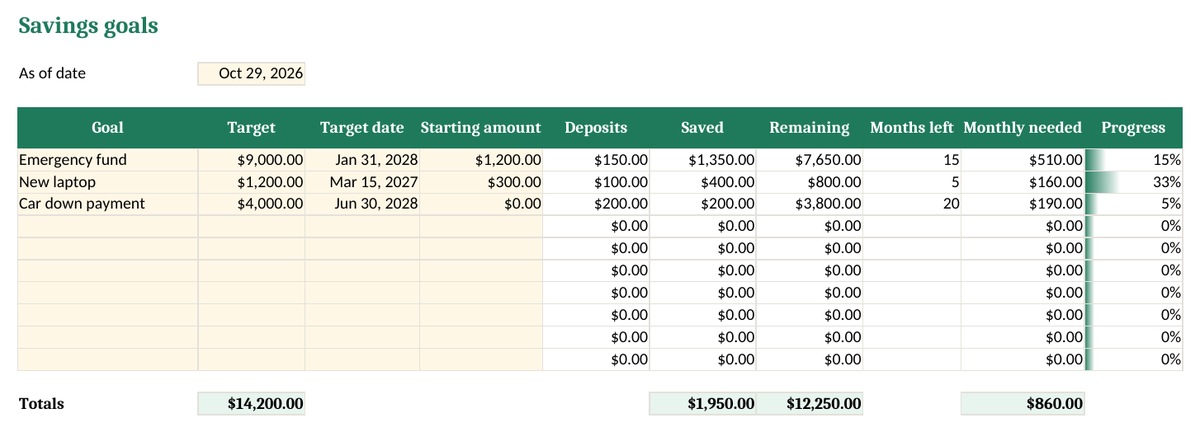
We entered three made-up goals and three made-up deposits into a copy of our Savings Goals Tracker and recalculated it. These are sample numbers only, not a recommendation for what anyone should save or by when.
The tracker's As of date uses today's date, so its months left and monthly needed results depend on the day you open it. Ours were calculated with an As of date of Oct 29, 2026.
Step 1: size the emergency fund. On the Emergency Fund tab we entered made-up essential monthly expenses of $1,500 and kept the months of coverage goal at its prefilled 6. The tab shows an emergency fund target of $9,000.00, which we used as the target for the Emergency fund goal.
Step 2: inputs on the Goals tab.
- Emergency fund: target $9,000, target date Jan 31, 2028, starting amount $1,200
- New laptop: target $1,200, target date Mar 15, 2027, starting amount $300
- Car down payment: target $4,000, target date Jun 30, 2028, starting amount $0
Step 3: inputs on the Deposits tab.
- Oct 9, 2026: $150 to Emergency fund
- Oct 9, 2026: $100 to New laptop
- Oct 23, 2026: $200 to Car down payment
What the Goals tab shows:
- Emergency fund: deposits $150.00, saved $1,350.00, remaining $7,650.00, months left 15, monthly needed $510.00, progress 15%
- New laptop: deposits $100.00, saved $400.00, remaining $800.00, months left 5, monthly needed $160.00, progress 33%
- Car down payment: deposits $200.00, saved $200.00, remaining $3,800.00, months left 20, monthly needed $190.00, progress 5%
- Totals: target $14,200.00, saved $1,950.00, remaining $12,250.00, monthly needed $860.00
How to read it:
- Saved is the starting amount plus the deposits logged for that goal. The laptop shows $400.00: $300 to start plus a $100 deposit.
- Remaining is the target minus saved: $1,200.00 minus $400.00 is $800.00 for the laptop.
- Months left counts calendar months from the As of month to the target month, with a minimum of 1. October 2026 to March 2027 is 5, so the laptop is a short term goal by the CFPB's six month line. The emergency fund (15 months) and car down payment (20 months) are long term goals.
- Monthly needed is remaining divided by months left: $800.00 over 5 months is $160.00, $7,650.00 over 15 months is $510.00, and $3,800.00 over 20 months is $190.00.
- Progress is saved divided by target, shown as a whole percent with a progress bar.
- The Totals row adds the monthly needed column to $860.00. That is the combined amount these three goals need each month to stay on schedule.
Notice how the date drives the result. The car down payment has the most left to save after the emergency fund, yet it needs only $190.00 a month because its date is 20 months out. The laptop needs less in total but nearly as much per month, because only 5 months are left. If a monthly amount is more than you can set aside, moving that goal's target date later is the quickest change to test in the sheet.
Because the As of date updates on its own, months left will drop by one when the calendar moves into November 2026, and monthly needed will rise for any goal that has not received new deposits.
Tracking your goals
The Savings Goals Tracker costs $12. It tracks up to 10 goals at once, shows the monthly amount needed to hit each target date, keeps a deposit log where you pick the goal from a dropdown, shows a progress bar for each goal, and includes the Emergency Fund tab used above. Withdrawals go in as negative amounts on the Deposits tab.
To make room for the monthly total in your spending plan, the Monthly Budget template has Savings type categories that count toward its savings rate. The Monthly Budget costs $12.
Both are built for Excel. They only track the numbers you enter; they do not move or hold any money.
Sources
- CFPB, Setting SMART goals (Your Money, Your Goals toolkit): what SMART stands for, starting from your values, focusing on one or two priorities, and short term (less than six months) vs long term (more than six months) goals
- CFPB, Savings plan (Your Money, Your Goals toolkit): the steps for a savings target and the $1,000 in about 40 weeks, $25 a week example
- CFPB, An essential guide to building an emergency fund: how to think about the size of an emergency fund, setting a goal, and monitoring progress
- Savings Goals Tracker template page and Monthly Budget template page: features and prices
- All example results: recalculated from the tracker's own formulas with an As of date of Oct 29, 2026
FAQ
How do I set a savings goal?
Name what you are saving for, put a dollar amount and a date on it, subtract anything you have already saved, and divide what is left by the months (or weeks) until the date. That gives you a regular amount to set aside, which you then track until the goal is reached.
What are some examples of savings goals?
Common ones include an emergency fund, a new laptop or phone, a car down payment, a vacation, holiday gifts, moving costs or a home down payment. The CFPB's SMART goals tool calls goals short term if they take less than six months to achieve and long term if they take more than six months.
How much should I save each month for a goal?
Divide the amount you still need by the number of months until your target date. In our made-up example, a new laptop with $800.00 still needed and 5 months left came out to $160.00 a month. The right target and date depend on your own situation.
What is the difference between a savings goal and a sinking fund?
A sinking fund is a type of savings goal for a cost you know is coming and can put a date on, like an insurance renewal or holiday gifts. A savings goal can be anything you want to reach, including goals with no natural due date, such as an emergency fund, where you pick the date yourself. The math is the same.
Can a spreadsheet track several savings goals at once?
Yes. The Savings Goals Tracker holds up to 10 goals, each with a target, target date and starting amount, plus a deposit log. It shows saved, remaining, months left, the monthly amount needed and a progress bar for each goal, and a separate Emergency Fund tab sizes an emergency fund from your monthly expenses.
Related templates
Savings Goals Tracker
Set goals, track deposits, and see the monthly amount needed to hit each one.
$12
View templateMonthly Budget
Plan every dollar for the month and see what is left at a glance.
$12
View template