Envelope Budgeting: Use Categories as Digital Envelopes
By Cells and Cents. Published November 17, 2026.
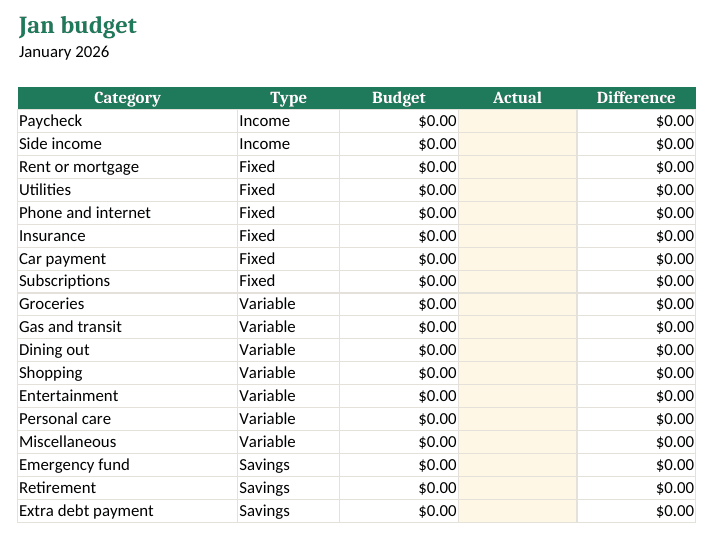
Envelope budgeting is a method where you split your income into spending categories, or envelopes, and spend from each one only up to the amount you put in it. This guide covers a digital spreadsheet version, not cash envelopes. Each budget category is an envelope, and its budget minus what you have spent shows what is left.
This is for informational purposes only and is not tax, legal, or financial advice.
Below we cover how the envelope method works, how to run it as digital envelopes in our Monthly Budget Excel template, and a worked example: a made-up single earner's March 2027, checked once in the middle of the month and again at the end, with every figure taken from the recalculated workbook.
How envelope budgeting works
The classic version uses paper envelopes. On payday you label one envelope per category (groceries, gas, dining out and so on), put the planned amount of cash in each, and pay for things in that category only from its envelope. When an envelope is empty, spending in that category stops for the month unless you move money over from another envelope.
The method has three simple rules:
- Fill the envelopes. Decide how much of the month's income goes into each category before you spend it.
- Spend only what is in the envelope. Each category has its own limit.
- Adjust on purpose. If one envelope runs short, move money from another one, and decide what to do with whatever is left at the end of the month.
The Consumer Financial Protection Bureau describes the same idea in its Managing spending guide for financial educators, using special occasions as its example category: pick an amount to spend on special occasions every month, write it on an envelope, keep those receipts in it, and total them at the end of the month. If you are over budget, deduct the difference from next month's special occasion budget. Its Consumer tips for managing spending worksheet adds a weekly version: set a weekly spending limit for small purchases, consider setting aside cash for them at the start of the week, and do not spend more than you set aside.
A digital version: categories as envelopes, not cash
This guide is about a digital spreadsheet version of envelope budgeting, not cash envelopes. You do not need to withdraw cash or use paper envelopes. You keep paying the way you already do, and the spreadsheet does the envelope math:
- Each budget category is an envelope. Groceries, gas and transit, dining out and so on each get their own row.
- The budget amount is what you put in the envelope.
- The actual amount is what you have spent from it so far.
- Budget minus actual is what is left in the envelope.
Why bother with the math when you pay by card? The CFPB's Consumer insights on managing spending report notes that non-cash payments give less immediate feedback than a shrinking stack of money in your wallet, and that consumers usually do not see the results of credit card purchases until the statement arrives. Updating your spending in the spreadsheet during the month is the digital stand-in for looking inside the envelope.
The trade-off is that nothing stops a card from going over. A digital envelope is only a limit you agree to check, so it works best if you update the actual amounts regularly, such as weekly or on payday.
How to set up digital envelopes in the Monthly Budget
The Monthly Budget template has a Setup tab where you list up to 30 categories. Each category gets a type (Income, Fixed, Variable or Savings, chosen from a dropdown) and a monthly budget. Each of the 12 month tabs then pulls those categories and budgets from Setup and has an Actual column for you to fill in.
- List your income. Enter your paycheck and any other income as Income lines. This is the money you have to put in envelopes.
- Make an envelope for each category. Fixed lines (rent, insurance, a car payment) are envelopes that empty on bill day. Variable lines (groceries, gas, dining out) are the envelopes you watch during the month. Savings lines are envelopes for money set aside toward a goal.
- Fill the envelopes. Give each category a budget. At the bottom of each month tab, Money left over (total income minus total fixed, total variable and total savings) shows how much income is not yet in an envelope.
- Record spending as it happens. On the month tab, type what you have spent so far in each category's Actual cell.
- Read what is left. The Difference column is actual minus budget. For a spending envelope, a negative Difference means money is still left in it, and a positive Difference means it went over.
A few things the template does not do, so you can plan around them:
- It does not roll balances forward. Every month tab takes its budgets from the same Setup tab, so each month starts with the same envelope amounts. If you change a budget on Setup, it changes on all 12 month tabs.
- It does not log individual purchases. Each category has one Actual cell for the month, so you update a running total for each envelope.
- It does not connect to a bank or move money. It only totals the numbers you enter.
Worked example: a made-up March in digital envelopes
We filled in a copy of the Monthly Budget template for a made-up single earner, set the year on Setup to 2027, entered March figures on the Mar tab, and recalculated the workbook from its own formulas in LibreOffice. We removed the starter Side income line so the example has one paycheck. These are sample numbers only, not a suggestion for what anyone should earn, spend or save.
Step 1: fill the envelopes
Take-home pay for March is $3,960.00. Every dollar goes into an envelope:
Fixed envelopes, $1,920.00 in total:
- Rent or mortgage: $1,280.00
- Utilities: $140.00
- Phone and internet: $95.00
- Insurance: $110.00
- Car payment: $260.00
- Subscriptions: $35.00
Variable envelopes, $1,190.00 in total:
- Groceries: $520.00
- Gas and transit: $160.00
- Dining out: $150.00
- Shopping: $120.00
- Entertainment: $80.00
- Personal care: $60.00
- Miscellaneous: $100.00
Savings envelopes, $850.00 in total:
- Emergency fund: $400.00
- Retirement: $300.00
- Extra debt payment: $150.00
Check: $1,920.00 + $1,190.00 + $850.00 = $3,960.00. The Mar tab shows Money left over of $0.00 in the Budget column and a planned Savings rate of 21.5%.
Step 2: look inside the envelopes on March 15
Halfway through the month, we entered spending so far in the variable envelopes only. The Difference column showed how much was left in each one (shown here as budget minus actual):
- Groceries: $268.43 spent of $520.00, $251.57 left
- Gas and transit: $74.10 spent of $160.00, $85.90 left
- Dining out: $96.85 spent of $150.00, $53.15 left
- Shopping: $41.27 spent of $120.00, $78.73 left
- Entertainment: $32.00 spent of $80.00, $48.00 left
- Personal care: $18.99 spent of $60.00, $41.01 left
- Miscellaneous: $22.50 spent of $100.00, $77.50 left
Total variable showed $554.14 actual against $1,190.00 budgeted, so $635.86 was still in the variable envelopes. Dining out stands out: $96.85 of its $150.00 was gone by mid-month, leaving $53.15 for the second half. That is the kind of early warning a cash envelope gives you when you look inside it.
During the month, ignore the Money left over line in the Actual column. It reads -$554.14 here only because income and bills had not been entered yet.
Step 3: close out the month
At the end of March, we entered the full month's actuals:
- Paycheck: $3,960.00
- Utilities: $152.61 (Difference $12.61, over)
- Groceries: $509.76 (Difference -$10.24, left)
- Gas and transit: $151.38 (Difference -$8.62, left)
- Dining out: $168.40 (Difference $18.40, over)
- Shopping: $97.15 (Difference -$22.85, left)
- Personal care: $44.99 (Difference -$15.01, left)
- Miscellaneous: $63.25 (Difference -$36.75, left)
- Every other envelope matched its budget exactly: Rent or mortgage $1,280.00, Phone and internet $95.00, Insurance $110.00, Car payment $260.00, Subscriptions $35.00, Entertainment $80.00, Emergency fund $400.00, Retirement $300.00 and Extra debt payment $150.00.
The bottom of the Mar tab showed:
- Total income: $3,960.00 budgeted, $3,960.00 actual
- Total fixed: $1,920.00 budgeted, $1,932.61 actual
- Total variable: $1,190.00 budgeted, $1,114.93 actual
- Total savings: $850.00 budgeted, $850.00 actual
- Money left over: $0.00 budgeted, $62.46 actual
- Savings rate: 21.5% budgeted, 21.5% actual
Step 4: see where the $62.46 came from
- Five variable envelopes had money left: $10.24 + $8.62 + $22.85 + $15.01 + $36.75 = $93.47.
- Dining out went over by $18.40, so the variable envelopes ended $93.47 minus $18.40 = $75.07 under in total ($1,190.00 minus $1,114.93).
- The Utilities envelope went over by $12.61.
- Money left over: $75.07 minus $12.61 = $62.46, the same as $3,960.00 minus $1,932.61 minus $1,114.93 minus $850.00.
In cash terms, the overspent Dining out and Utilities envelopes were covered by money left in the other envelopes, with $62.46 to spare.
Step 5: decide what the leftover and the overspend do
The leftover. In this example, the $62.46 went to the emergency fund. We changed the Emergency fund line's Actual to $462.46 and recalculated. The Mar tab then showed Total savings of $912.46 actual, Money left over of $0.00 and an actual Savings rate of 23.0%. Leaving it as a cushion for next month would also be a choice; the spreadsheet just records it.
The overspend. Applying the CFPB's special occasions suggestion (deduct an overspend from next month's budget for that category) to Dining out, the April Dining out target would be $150.00 minus $18.40 = $131.60. Because the template takes April's budgets from Setup, the Apr tab will still show a $150.00 Dining out budget. Keeping April's Dining out actual at $131.60 or less would show a Difference of -$18.40 or lower there, which is how you would see the overspend made up.
Envelope budgeting vs other budget methods
Envelope budgeting is about spending limits per category during the month. It pairs naturally with other methods:
- A zero-based budget fills the envelopes until every dollar of income has a job, which is what Step 1 above does. That guide walks through a different month in the same template.
- The 50/30/20 budget sets the size of three big groups (needs, wants and savings), which you can then split into envelopes.
- A sinking fund is a savings envelope for a known future cost, such as car repairs or holiday gifts.
- If money is tight, how to budget money on low income covers filling the essential envelopes first, and how to build an emergency fund covers sizing that savings envelope.
- For a plain month with the starter categories, see our personal budget example in Excel.
Which template fits
The Monthly Budget template costs $12. It has 12 monthly tabs plus a yearly summary, budgeted vs actual with automatic differences, customizable categories, savings rate and money left over indicators, and a chart that updates as you type. To try a simpler one-month version first, the free starter budget spreadsheet has budgeted vs actual columns, automatic totals, money left over and a savings rate.
If your savings envelopes are for several goals, the Savings Goals Tracker costs $12 and tracks up to 10 goals with the monthly amount needed to hit each target date.
These are .xlsx files built for Microsoft Excel, with no macros. They only total the numbers you enter; they do not hold cash, connect to bank accounts or move money.
Sources
- Consumer Financial Protection Bureau, Managing spending: Ideas for financial educators: a monthly special occasions envelope: writing the amount on it, totaling receipts at month end, and deducting an overspend from next month's special occasion budget
- Consumer Financial Protection Bureau, Consumer tips for managing spending: a weekly spending limit for small purchases, set aside at the start of the week
- Consumer Financial Protection Bureau, Consumer insights on managing spending: non-cash payments give less immediate feedback than cash in a wallet
- Monthly Budget template page, Savings Goals Tracker template page and free starter budget spreadsheet: features and prices
- All example results: entered as made-up sample data in a copy of the Monthly Budget template and recalculated from its own formulas in LibreOffice on November 15, 2026
FAQ
What is envelope budgeting?
It is a budgeting method where you split your income into spending categories, called envelopes, and spend from each category only up to the amount you put in it. When an envelope is empty, spending in that category stops until the next month, or until you move money in from another envelope.
Do I need cash for envelope budgeting?
No. The traditional version uses paper envelopes of cash, but the same idea works in a spreadsheet. This guide covers a digital version, where each budget category is an envelope and the amount left in it is the budget minus what you have spent so far. You can keep paying by card or bank transfer.
How do you do envelope budgeting in a spreadsheet?
List your categories with a monthly budget amount for each one, which is the money you put in that envelope. During the month, enter what you have spent in each category. Budget minus actual is what is left in the envelope. In our template the Difference column shows actual minus budget, so a negative number on a spending line means money is still left in that envelope.
What happens if I overspend an envelope?
You can move money in from an envelope that has some left, or carry the overspend into next month. A CFPB guide for financial educators uses a special occasions envelope as its example and suggests that if you go over that budget, you deduct the difference from next month's special occasion budget. Applied to our made-up example, Dining out went $18.40 over a $150.00 envelope, so the next month's target becomes $131.60.
What happens to money left in envelopes at the end of the month?
It is up to you. Some people leave it in the envelope, and others move it to a savings goal. In our made-up March, the envelopes left $62.46 unspent overall, and moving it to the emergency fund line brought money left over to $0.00. The template does not carry balances into the next month on its own.
Related templates
Monthly Budget
Plan every dollar for the month and see what is left at a glance.
$12
View templateSavings Goals Tracker
Set goals, track deposits, and see the monthly amount needed to hit each one.
$12
View template