Income and Expense Spreadsheet for Freelancers
By Cells and Cents. Published November 10, 2026.
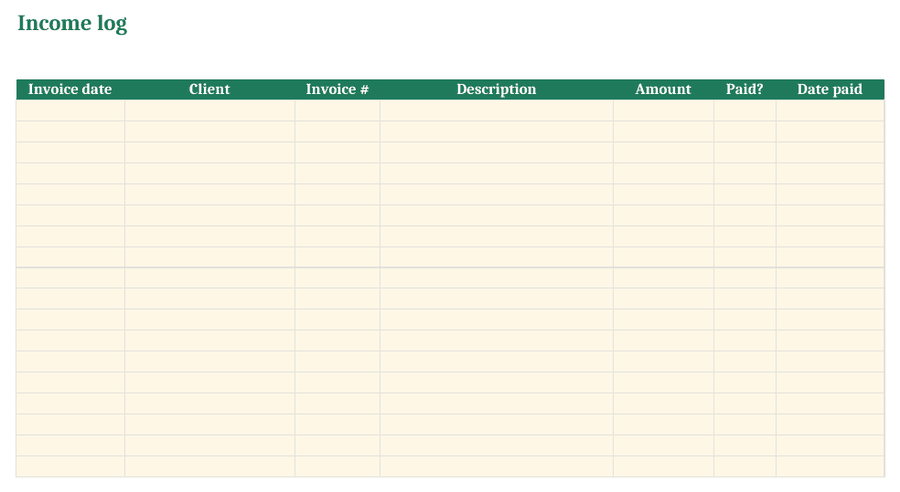
An income and expense spreadsheet for freelancers is a log of each invoice and each business expense, with totals that show cash received, money still outstanding, spending, and profit. You enter invoices as you send them, mark which ones clients have paid, and record expenses as they happen. The dashboard then totals cash received versus still-open invoices.
This is for informational purposes only and is not tax, legal, or financial advice.
Below we cover what to record for each invoice and expense, how paid and unpaid invoices show up differently, and a worked example: a made-up freelance copywriter's November, entered in the Freelancer Income and Expense Tracker and recalculated from the file itself. If you also want to plan a month against those actuals, see our business budget template in Excel.
Why log invoices and expenses
The IRS page What kind of records should I keep says you may choose any recordkeeping system suited to your business that clearly shows your income and expenses. The system should include a summary of your business transactions, ordinarily kept in your business books.
That same page says supporting documents include sales slips, paid bills, invoices, receipts, deposit slips, and canceled checks. Those documents contain the information you need to record in your books, and you should keep them because they support the entries in your books and on your tax return. The IRS suggests organizing them by year and type of income or expense.
A spreadsheet does not replace those documents. It is the summary: each invoice and each expense in one place, with monthly totals you can read without paging through a pile of PDFs.
What to record for each invoice
On the Income tab of the Freelancer Income and Expense Tracker, each row is one invoice:
- Invoice date
- Client
- Invoice number
- Description
- Amount
- Paid (Yes or No)
- Date paid
The IRS page on records says gross receipts are the income you receive from your business, and that you should keep supporting documents that show the amounts and sources of those receipts. Invoices are on that list of documents. The client name and invoice number identify the source; the amount and dates are what the log has to capture.
The How should I record my business transactions? page adds a practical habit: identify the sources of income, and generally record transactions on a daily basis. For freelance work, that usually means logging an invoice when you send it, then coming back to mark Paid as Yes and fill in the date paid when the money arrives.
What to record for each expense
On the Expenses tab, each row is one business cost:
- Date
- Vendor
- Category
- Description
- Amount
The IRS records page says expense supporting documents should identify the payee, the amount paid, proof of payment, the date incurred, and a description of the item purchased or service received that shows the amount was for a business expense. The vendor, amount, date, and description columns match those details. Proof of payment stays with the receipt, bank record, or card statement you keep alongside the log.
That same how-to-record page says to record expenses when they occur. The category comes from a dropdown fed by the Categories tab. The file starts with 18 names, including Advertising, Insurance, Office expense, Supplies, Travel, Software and subscriptions, Phone and internet, Education, Bank and payment fees, and Other. You can rename them, and they also feed the Dashboard's category totals.
How the Dashboard treats paid and unpaid invoices
Set the year on the Dashboard (2026 in the example below). It then totals each month and a year-to-date row.
Income received is not "every invoice you sent that month." The Dashboard counts an invoice as income received in the month of its date paid, and only when Paid is set to Yes. An invoice dated in October and paid in November lands in November. An invoice you sent in November that is still unpaid does not count as income received yet.
Unpaid invoices show separately as a total and a count. Those two figures include every invoice marked Paid No in the log, not only the ones from the month you are looking at. Together, the monthly income received figure and the unpaid total are a cash-received versus still-open view of the same invoice list.
Expenses are totaled by the expense date, and profit for each month is income received minus expenses.
Worked example: a copywriter's November
Here is a made-up freelance copywriter's November 2026. We entered sample rows into a copy of the Freelancer Income and Expense Tracker with the Dashboard year set to 2026, and recalculated it with LibreOffice. These are sample numbers only, not a suggestion for what anyone should earn or spend.
Step 1: the Income tab
- Invoice date Oct 22, 2026, Rivermark Co., INV-3312, homepage copy rewrite, $1,250.00, Paid Yes, date paid Nov 3, 2026
- Invoice date Nov 4, 2026, Pine & Paper, INV-3313, product email series, $875.00, Paid Yes, date paid Nov 14, 2026
- Invoice date Nov 10, 2026, Eastfield Clinic, INV-3314, patient welcome packet, $2,100.00, Paid Yes, date paid Nov 21, 2026
- Invoice date Nov 18, 2026, Blue Mesa Outfitters, INV-3315, catalog product descriptions, $1,450.00, Paid No, no date paid
- Invoice date Nov 25, 2026, Rivermark Co., INV-3316, about-page refresh, $640.00, Paid No, no date paid
Step 2: the Expenses tab
- Nov 1, writing app, Software and subscriptions, monthly plan, $12.00
- Nov 3, phone carrier, Phone and internet, business line, $58.00
- Nov 6, office store, Office expense, printer paper and envelopes, $31.64
- Nov 11, liability insurer, Insurance, monthly premium, $42.00
- Nov 13, transit agency, Travel, client visit to Eastfield, $67.40
- Nov 16, office store, Supplies, notebooks and pens, $18.27
- Nov 19, research database, Software and subscriptions, monthly plan, $29.00
- Nov 22, payment processor, Bank and payment fees, card processing fees, $84.15
Step 3: what the Dashboard shows
- November income received: $4,225.00
- November expenses: $342.46
- November profit: $3,882.54
- Unpaid invoices: $2,090.00, count 2
- Category year totals: Software and subscriptions $41.00, Phone and internet $58.00, Office expense $31.64, Insurance $42.00, Travel $67.40, Supplies $18.27, Bank and payment fees $84.15, and $0.00 in every other category
Because every payment and every expense in the sample falls in November 2026, the year-to-date row matches November: income received $4,225.00, expenses $342.46, and profit $3,882.54. October income received is $0.00, even though one invoice was dated October 22.
Step 4: reading cash received versus still-open invoices
- Paid invoices that count in November: $1,250.00 + $875.00 + $2,100.00 = $4,225.00. That matches income received. INV-3312 was sent in October, but the date paid is November 3, so the Dashboard counts it in November.
- Still-open invoices: $1,450.00 + $640.00 = $2,090.00, and there are two of them. That matches the unpaid total and the unpaid count. Neither amount is in November's income received.
- Invoiced versus received: the five invoices add up to $6,315.00. Only the $4,225.00 that has been paid is treated as income received. The other $2,090.00 is still outstanding.
- Expenses: $12.00 + $58.00 + $31.64 + $42.00 + $67.40 + $18.27 + $29.00 + $84.15 = $342.46, the same as the November expenses total. Software and subscriptions is $12.00 + $29.00 = $41.00.
- Profit: $4,225.00 minus $342.46 = $3,882.54.
If either unpaid invoice is later marked Paid Yes with a date paid in December, December's income received will pick it up, and the unpaid total and count will drop. Until then, the Dashboard keeps that $2,090.00 visible as money that has been invoiced but not collected.
These numbers apply to this made-up month only. Your clients, amounts, and payment timing will be different.
Setting up your own log
- On the Dashboard, set the year.
- On the Categories tab, rename or replace the starter categories so they match how you actually spend.
- When you send an invoice, add a row on the Income tab and leave Paid as No until the client pays.
- When the money arrives, change Paid to Yes and enter the date paid. Income received will land in that month.
- When you incur a business expense, add a row on the Expenses tab and pick its category from the dropdown. Keep the receipt or statement with your other records.
- Use the Dashboard to read the month's income received, expenses, and profit, and to see the unpaid total and count.
The unpaid figures stay useful between invoices. If the count climbs, you can sort the Income tab by the Paid column and follow up on the rows still marked No.
How this differs from a business budget
This page is about logging what happened: each invoice, whether it has been paid, each expense, and the totals for cash received versus still-open work. The tracker does not have a planned or budget column.
Our business budget template in Excel is the page about planning a month. It walks through writing expected income and a planned amount for each expense category, then comparing that list with the Dashboard after the month ends.
Which template fits
The Freelancer Income and Expense Tracker costs $17. It logs up to 500 invoices and 1,000 expenses, and its Dashboard shows monthly and year-to-date income, expenses and profit, unpaid invoices, and a category breakdown. It is built for Excel, with no macros. It only totals the numbers you enter; it does not connect to any bank accounts or move any money. The tracker's set-aside estimate is not a payment. For the 2026 estimated tax due dates, including January 15, 2027, see our January 15, 2027 estimated tax payment guide.
Sources
- IRS, What kind of records should I keep: choosing a recordkeeping system that clearly shows income and expenses, keeping a summary of business transactions, supporting documents (including invoices and receipts), organizing them by year and type, documents for gross receipts, and what expense documents should identify
- IRS, How should I record my business transactions?: recording each transaction from its supporting documents, identifying the sources of income, recording expenses when they occur, and recording transactions on a daily basis
- Freelancer Income and Expense Tracker template page: features and price. The 500 invoice and 1,000 expense limits are the row ranges in the template file itself
- All example results: entered as made-up sample rows and recalculated from the tracker's own formulas in LibreOffice on November 8, 2026
FAQ
What is an income and expense spreadsheet for freelancers?
It is a log of each invoice and each business expense, plus totals that show cash received, invoices that are still unpaid, spending, and profit. The Freelancer Income and Expense Tracker is one such spreadsheet. It records actual invoices and expenses and does not have a planned or budget column.
How does the tracker count income received versus unpaid invoices?
The Dashboard counts an invoice as income received in the month of its date paid, and only when Paid is set to Yes. Invoices marked Paid No are totaled separately as unpaid invoices, along with a count of how many are still open. That unpaid total includes every unpaid invoice in the log, not just the current month.
What should I write down for each invoice and each expense?
For each invoice, record the invoice date, client, invoice number, a short description, the amount, whether it is paid, and the date paid once the money arrives. For each expense, record the date, vendor, category, a short description, and the amount. The IRS says expense supporting documents should identify the payee, the amount paid, proof of payment, the date incurred, and a description that shows the amount was for a business expense. Keep the invoices and receipts that support those entries.
Does an income and expense spreadsheet replace a business budget?
No. A log shows what was invoiced, what was paid, and what was spent. A business budget is a plan for the month's income and each expense category, checked against those actuals. Our guide on a business budget template in Excel covers that planning step.
What does the worked example show?
A made-up freelance copywriter in November 2026. Three invoices were paid that month for a total of $4,225.00. Two invoices totaling $2,090.00 were still unpaid. Expenses came to $342.46, and profit, meaning income received minus expenses, was $3,882.54. An October invoice that was paid on November 3 counted in November because the Dashboard uses the date paid.
Related template
Freelancer Income and Expense Tracker
Log invoices and expenses, see profit by month, and stay ready for tax time.
$17
View template