Christmas budget: how to plan holiday spending
By Cells and Cents. Published November 8, 2026.
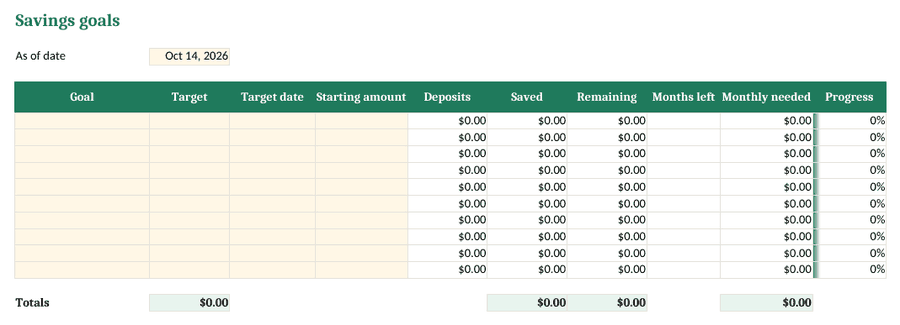
A Christmas budget sets your total holiday spend and per-person gift limits before you shop. Split that total into gifts, food, wrapping, and travel if needed, then treat the gifts pot as a dated savings goal (a sinking fund). Divide what you still need by the months left so each month gets a clear set-aside.
This is for informational purposes only and is not tax, legal, or financial advice.
Below we walk through building a Christmas budget, setting per-person gift limits, funding holiday costs as a sinking fund, fitting that amount into a monthly budget, and a worked example recalculated in our Savings Goals Tracker and Monthly Budget templates.
Set a total before you shop
A Christmas budget works best when the total comes first and the shopping list comes second. Pick a dollar amount you are willing to spend on the whole holiday (gifts plus the extras), write it down, and treat it as a ceiling rather than a starting point for later add-ons.
The Consumer Financial Protection Bureau's Setting SMART goals tool describes useful money goals as Specific, Measurable, Achievable, Relevant and Time bound. For holiday spending, that usually means:
- Specific: Christmas or holiday costs for this year, not "spend less on gifts" in general.
- Measurable: a total dollar amount, plus smaller category amounts.
- Achievable: an amount you can fund from income or from money already set aside.
- Relevant: a total that matches what matters for your household this year.
- Time bound: a date before you need to buy and wrap gifts (often mid December).
The CFPB's savings plan tool then turns a goal into a weekly or monthly set-aside: write the goal, figure out the total, decide how many weeks (or months) you have, and divide. Its own example is saving $1,000 within about 40 weeks, which works out to $25 a week.
Split the total into holiday categories
Gifts are usually the largest line, but they are rarely the only one. Common Christmas budget categories include:
- Gifts: the per-person list below
- Food and hosting: special groceries, baking, or a meal you host
- Wrapping, cards and postage
- Travel or visiting costs, if any
- A small buffer for tax on purchases, shipping, or a last-minute add
Utah State University Extension's guide to budgeting for non-monthly expenses says to note how much each expense will be and when you need the money, count the months you have to save, and divide. It also notes that dividing every yearly cost by 12 does not always work when the due date is sooner than year end. Christmas is the classic case: by early November you may have only one calendar month left before mid December.
The CFPB's older savings plan tool PDF asks whether you have money set aside for expenses that come one to four times per year, and lists holidays (gifts, special food, and so on) among the examples, alongside birthdays and back to school costs.
Set per-person gift limits
Once the gifts line has a total, assign a dollar limit to each person (or to a pool, such as teachers or coworkers) so the limits add up to that line and no further. A simple way to do it:
- List everyone you plan to buy for.
- Write a limit next to each name.
- Add the limits. If the sum is over your gifts total, lower some limits or shorten the list until it fits.
- Shop against the limit, not against the idea of the perfect gift.
Per-person limits are a planning tool, not a rule about what anyone "should" spend. They exist so one purchase does not quietly consume the whole gifts budget.
Treat Christmas gifts as a sinking fund
A sinking fund is money set aside a little at a time for a specific expense you know is coming. Holiday gifts fit that definition: you can estimate the amount and put a date on it.
The setup math matches how to set a savings goal:
- Enter the gifts target (and any other dated holiday pots you want to track separately).
- Subtract what you have already saved for them.
- Count the months until the target date.
- Divide remaining by months left. That is this month's set-aside.
If you started earlier in the year, the monthly amount is smaller. If you are starting in November for a mid December date, months left is often 1, so the remaining balance becomes this month's contribution.
Fit the Christmas fund into your monthly budget
The savings tracker answers "how much do I still need to set aside for Christmas?" Your monthly budget answers "does this month have room for that amount?"
Add a Savings category such as "Christmas fund" and budget the monthly needed total from the tracker. Keep everyday shopping in Variable categories so gift spending you fund from the Christmas pot does not get double counted as both a new expense and a savings deposit. When you buy gifts from money already saved, log a withdrawal (a negative deposit) on the tracker's Deposits tab so the saved balance drops as the cash is used.
A free starting point for the month itself is our free budget template. The paid Monthly Budget template ($12) adds budgeted vs actual across 12 months, a savings rate, and money left over.
Worked example: a Christmas budget in the Savings Goals Tracker
We planned a made-up household Christmas total of $1,150.00, entered three dated holiday goals and six deposits into a copy of our Savings Goals Tracker, and recalculated it. These are sample numbers only, not a recommendation for what anyone should spend or save.
Christmas budget plan (before the sheet):
- Gifts: $850.00
- Food and hosting: $220.00
- Wrapping, cards and misc: $80.00
- Total: $1,150.00
Per-person gift limits inside the $850.00 gifts line:
- Partner: $200.00
- Child: $175.00
- Parent A: $100.00
- Parent B: $100.00
- Sibling: $75.00
- Niece and nephew pool: $100.00
- Teachers, coworkers and host gifts: $75.00
- Buffer for tax, shipping or a last-minute add: $25.00
The tracker's As of date uses today's date when you open a fresh copy, so months left and monthly needed depend on the day. Ours were calculated with an As of date of Nov 6, 2026.
Inputs on the Goals tab:
- Christmas gifts 2026: target $850.00, target date Dec 15, 2026, starting amount $200.00
- Christmas food and hosting: target $220.00, target date Dec 20, 2026, starting amount $50.00
- Wrapping cards and misc: target $80.00, target date Dec 10, 2026, starting amount $0.00
Inputs on the Deposits tab:
- Oct 8, 2026: $125.00 to Christmas gifts 2026
- Oct 8, 2026: $40.00 to Christmas food and hosting
- Oct 22, 2026: $100.00 to Christmas gifts 2026
- Nov 3, 2026: $75.00 to Christmas gifts 2026
- Nov 3, 2026: $20.00 to Wrapping cards and misc
- Nov 3, 2026: $30.00 to Christmas food and hosting
What the Goals tab shows (As of Nov 6, 2026):
- Christmas gifts 2026: deposits $300.00, saved $500.00, remaining $350.00, months left 1, monthly needed $350.00, progress 59%
- Christmas food and hosting: deposits $70.00, saved $120.00, remaining $100.00, months left 1, monthly needed $100.00, progress 55%
- Wrapping cards and misc: deposits $20.00, saved $20.00, remaining $60.00, months left 1, monthly needed $60.00, progress 25%
- Totals: target $1,150.00, saved $640.00, remaining $510.00, monthly needed $510.00
How to read it:
- Saved is starting amount plus deposits. Christmas gifts shows $500.00: $200.00 to start plus $300.00 in deposits.
- Remaining is target minus saved. Gifts: $850.00 minus $500.00 is $350.00.
- Months left counts calendar months from the As of month to the target month, with a minimum of 1. November 2026 to December 2026 is 1 for every goal here, so each remaining balance is due this month.
- Monthly needed is remaining divided by months left: $350.00, $100.00 and $60.00.
- Progress is saved divided by target, shown as a whole percent.
- The Totals row adds monthly needed to $510.00. That is the single Christmas set-aside to carry into November's spending plan.
Because only one month is left, starting earlier would have spread the same remaining balances over more months. The USU Extension guide's point about not always dividing by 12 is visible here: the calendar, not a flat yearly average, sets the contribution.
Worked example continued: November in the Monthly Budget
We then put that $510.00 Christmas total into a copy of our Monthly Budget as a Savings category named Christmas fund, filled a made-up single-earner November 2026 plan, and recalculated it. Sample numbers only.
November 2026 budget inputs (Setup categories and Nov actuals):
- Paycheck (Income): budget $4,200.00, actual $4,200.00
- Fixed bills (rent, utilities, phone, insurance, car payment, subscriptions): budget $2,155.00, actual $2,168.42
- Variable spending (groceries, gas, dining, shopping, entertainment, personal care, miscellaneous): budget $885.00, actual $834.08
- Emergency fund (Savings): budget $200.00, actual $200.00
- Retirement (Savings): budget $300.00, actual $300.00
- Christmas fund (Savings): budget $510.00, actual $510.00
What the Nov tab shows:
- Total income: budget $4,200.00, actual $4,200.00
- Total fixed: budget $2,155.00, actual $2,168.42
- Total variable: budget $885.00, actual $834.08
- Total savings: budget $1,010.00, actual $1,010.00
- Money left over: budget $150.00, actual $187.50
- Savings rate: budget 24.0%, actual 24.0%
The Christmas fund line matches the tracker's $510.00 monthly needed total. In this sample month, variable spending came in under budget, which left more money left over on the actual side even after the full Christmas set-aside.
Tracking Christmas next year
The Savings Goals Tracker costs $12. It tracks up to 10 goals, shows the monthly amount needed for each target date, keeps a deposit log, and includes an Emergency Fund tab for a separate cash reserve. After Christmas, you can reset the gifts goal's target date to next December and start monthly deposits again so the next holiday is funded earlier.
The Monthly Budget costs $12. Use it to give the Christmas fund a category next to the rest of the month and to compare budgeted vs actual.
Both are built for Excel. They only track the numbers you enter; they do not move or hold any money.
Sources
- CFPB, Setting SMART goals (Your Money, Your Goals toolkit): Specific, Measurable, Achievable, Relevant and Time bound
- CFPB, Savings plan (Your Money, Your Goals toolkit): dividing a savings total by the weeks or months left, with the $1,000 in about 40 weeks example
- CFPB, Savings plan tool (Your Money, Your Goals): expenses that come one to four times per year, including holidays (gifts, special food, and so on)
- Utah State University Extension, How do I budget for non-monthly expenses (Oct 13, 2020): dividing each cost by the months until it is due, and why a flat divide-by-12 can miss early due dates
- What is a sinking fund? and How to set a savings goal: sinking fund definition and monthly savings math
- Template pages: Savings Goals Tracker, Monthly Budget, and the free budget template
- All worked-example results: recalculated from the templates' own formulas with an As of date of Nov 6, 2026 (savings tracker) and a November 2026 monthly budget tab
FAQ
How do I make a Christmas budget?
Set a total holiday spend first, then split it into gifts, food or hosting, wrapping and cards, and travel if you have any. Give each gift recipient a dollar limit that adds up to the gifts line. Treat the gifts pot (and any other dated holiday costs) as a sinking fund with a target date before Christmas, and divide what you still need by the months left.
How much should I budget for Christmas gifts?
There is no single right number. Start from what you can set aside without borrowing for gifts, then assign per-person limits that add up to that gifts total. In our made-up example, a gifts target of $850.00 with per-person limits left $350.00 still needed as of Nov 6, 2026, which the tracker showed as $350.00 for the one month left until mid December.
What is the difference between a Christmas budget and a sinking fund?
A Christmas budget is the spending plan (total and categories, including per-person gift limits). A sinking fund is how you fund a dated piece of that plan a little at a time. The CFPB savings plan tool lists holidays (gifts, special food, and so on) among expenses that come one to four times per year. Our sinking fund guide covers the setup math in more detail.
How do I fit Christmas savings into a monthly budget?
Add a Savings category for the Christmas fund and budget the monthly amount your savings tracker says you still need. In our made-up November example, that Christmas fund line was $510.00, matching the tracker's combined monthly needed total for gifts, food and wrapping.
Can a spreadsheet track a Christmas gift budget?
Yes. The Savings Goals Tracker holds up to 10 goals with targets, target dates and a deposit log, and shows months left and monthly needed for each one. The Monthly Budget template can carry that monthly amount as a savings category next to the rest of the month.
Related templates
Savings Goals Tracker
Set goals, track deposits, and see the monthly amount needed to hit each one.
$12
View templateMonthly Budget
Plan every dollar for the month and see what is left at a glance.
$12
View template